

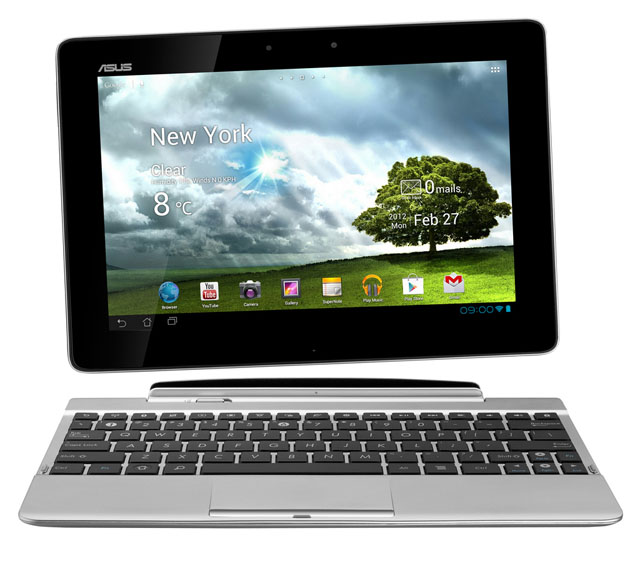
review The Transformer Pad TF300T represents another attempt by Taiwanese consumer electronics giant ASUS to bridge the gap between tablet and laptop, with an attachable keyboard providing additional functionality to this Android device. But does the Transformer Pad end up getting lost between two worlds? Read on to find out.
Design
Is it a tablet or is it a laptop? The answer, when it comes to ASUS’ Transformer Pad TF300T, is clearly both. Like the Enterprise D, ASUS’s latest tablet comes in two parts, which come together into a rather interesting whole.
The tablet portion of the Transformer Pad, which can be bought on its own in Australia for a recommended retail price of $499, is a fairly standard 10.1″ Android tablet. It’s made out of what appears to be stylised plastic, with smooth surfaces on its front and a fairly slippery ridged back. It has an eight megapixel camera on its back, a power button on the top left when the tablet is held horizontally, an audio jack and speaker on the right-hand side, and a volume rocker and micro-HDMI output connector on the left.
Those of you who constantly troll Delimiter with comments demanding microSD card slots on modern electronics gear will be extremely happy to know that the Transformer Pad does come with one — it’s on the left-hand side, mid-way down. So quit yer yapping. On the bottom of the tablet are two holes for docking the tablet with its attachable keyboard, and a 40-pin port which is also used for charging. On its front is a 1.2 megapixel camera for video calling.
Overall, most of this isn’t anything we haven’t seen before. The Transformer Pad measures 180x8mm by 263mm and is 9.9mm thick, weighing 635g, and when you pick it up, it’s as if you’re picking up any Android tablet made over the past year or so. It feels well-made, but fairly standard. It comes in “Royal Blue, Iceberg White and Torch Red” colours.
Now this is where this review gets a bit funky. For an additional $100 — and we recommend you definitely buy it if you buy this tablet — you get what ASUS calls the tablet’s ‘Mobile Dock’. This little baby basically looks and feels almost like the other half of a laptop, and when you connect the tablet portion of the Transformer Pad to it, you’ll end up with something that looks pretty much exactly like a netbook — but with a thicker screen and a thinner body.
The dock slides into place nicely and clicks to lock in to the Transformer Pad’s tablet. It has a close to full-sized keyboard which features a line of specialised tablet function keys above the numbers; a trackpad, a separate charging port, a SD card slot and a USB port. And it comes with an extra battery built-in. It is also made of plastic and weighs 546g.
To sum up: Without its dock, the ASUS Transformer Pad looks pretty much like any other 10.1″ Android tablet on the market. With it, it looks and feels like a netbook or perhaps an Ultrabook.
Features
The Transformer Pad’s hero feature is its transformable nature; it’s a feature which we haven’t seen on many other tablets, and it’s a great one. Being able to add a full-sized keyboard and extra battery life to a tablet, essentially transforming it into a laptop, is awesome, and something we expect to see more of in the future.
However, the Transformer Pad’s other features are also nothing to sneeze at. At its heart the tablet runs a NVIDIA Tegra 3 quad-core CPU at 1.2GHz; it features a GeForce 12-core graphics chip, 16GB or 32GB of storage space and a battery life rated at 10 hours; the dock adds another five hours. The screen resolution of the WXGA touchscreen is 1280×800, and the screen is a LED backlit IPS panel. We’ve mentioned the eight megapixel rear and 1.2 megapixel front cameras on the Transformer Pad previously, and it runs version 4 of Google’s Android operating system (Ice Cream Sandwich), praise be. We’re extremely happy to see the buggy previous version (Honeycomb) consigned to the graveyard of operating systems.
Most of these features are leading edge; in some areas, the Transformer Pad beats Apple’s new iPad on paper — for example, with respect to its cameras and its raw processing power.
Performance
With respect to the most important element of the Transformer Pad’s performance — its integration with the Mobile Dock unit — the tablet performs extremely well. After you work out how the two units fit together, it’s easy to connect the Mobile Dock, or as we preferred to refer to it, the ‘Battle Bridge’, to the main tablet unit (alternatively, the ‘Saucer section’). The tablet clicks into place and remains well held in by the docking unit.
When the tablet is separate, it functions just like any other Android tablet — you touch the screen to interface with it. However, when docked, an additional trackpad and keyboard control option opens up; you can control the screen pretty much as you would a netbook or laptop, with the mouse cursor replacing the touchscreen option. Even if the tablet is docked, you can still control the user interface with your fingers if you want, leading to some weird mental quandaries as you try to wrap your brain around whether you should use the trackpad, keyboard or touchscreen to pull off a particular manoeuvre.
The keyboard of the Transformer Pad was lovely; better than almost any netbook we’ve used, and approaching the quality of a full laptop keyboard. It would be more than adequate for long-term use. And the trackpad, while not quite as silky smooth as that found on Apple’s MacBook line (the gold standard, as far as we’re concerned), was still very good.
In general, other aspects of the performance of the Transformer Pad were also excellent. Battery life didn’t quite hold up to the device’s claimed 10 hours, but wasn’t very far short, while the mobile dock adds quite a few extra hours of charge; and you can charge both at the same time if you connect them and then connect the dock to mains power.
The performance of the Transformer Pad’s user interface when conducting any task was very fast; even watching HD videos from YouTube and so on. We had no complaints in this area; with a quad-core Tegra 3 CPU and an additional GeForce graphics chip, we’re not really surprised by this. And although much is up in the air with respect to Google’s new Jelly Bean version of Android announced this week, we’re sure the Transformer Pad’s power can handle it. This should deliver additional user interface performance gains to the tablet. We were also particularly impressed with the screen; it’s lovely, bright and vivid, and you will enjoy using it.
One caveat we had with the device was with the materials ASUS used. Its ridged back was quite slippery, and the plastic used in both the tablet itself and the dock come across as cheaper than that used in rivals tablets such as Apple’s iPad and Samsung’s Galaxy Tab series. The model came across in general as more functional and utilitarian than beautiful; which isn’t necessarily a bad thing, but worth mentioning.
Conclusion
If you’ve read this far, you will know by now that we were pretty impressed with the ASUS Transformer Pad. It performs well on all fronts, and is certainly a quality effort by its manufacturer. However, ultimately — and you may find this a little strange — we find it hard to recommend the device for many users. The reason is that it sits midway between two categories but doesn’t lead either.
The ASUS Transformer Pad TF300T isn’t the best device in the tablet category — that’s the iPad, which has a large number of advantages over the ASUS model, ranging from its stunning Retina display to its incredible app ecosystem and an operating system which still beats Android when it comes to tablets (although not anymore on smartphones). And with Apple’s new iPad starting at $539, it’s only a little more expensive that the Transformer Pad’s $499, or even cheaper than the device with its dock ($599).
You can also buy separate keyboard docks for the iPad (including third-party models), although we’d probably rate the Transformer Pad’s close integration above them.
Then there’s the Ultrabook class of laptops, which start at around $1,000 ($1,099 for the entry level MacBook Air model, for example) and can weigh about the same as the Transformer Pad TF300T, but with vastly enhanced functionality and a full PC operating system. These devices are often about the same size and weight, but better at being laptops than the Transformer Pad — much better — and they don’t cost that much more for a device you’ll likely use frequently, if not every day.
If your primary need is for a tablet, you’d likely be better off buying an iPad than a Transformer Pad. If your primary need is for a laptop, you’d likely be better off buying an ultrabook or a MacBook Air than a Transformer Pad. In this sense, the Transformer Pad is kind of stuck in the middle of two worlds — pretty much the same problem netbooks had.
Of course, this doesn’t make the Transformer Pad a bad device. As we’ve previously written, it’s actually an excellent device that we really liked; certainly one of the frontrunner Android tablets right now. And if you don’t want to sign up to Apple’s tablet ecosystem and don’t want a thin and light laptop, but would like a keyboard to go with your tablet that will significantly enhance its flexibility, you really can’t go past the Transformer Pad, which offers significant advantages over many of the other Android tablets on offer. It’s a great device, and you will likely be very happy with it. Of course, you may also want to check out another ASUS offering, the Transformer Pad Infinity, which looks set to improve on the Transformer Pad further (of course, likely at a higher price), but has not yet launched in Australia. It is apparently slated to do so next month (July).
Android tablet design has come a long way since the first disastrous efforts of Google’s cadre of manufacturers, which were largely ignored by Australian consumers. The ASUS Transformer Pad is an innovative and leading device helping to pioneer a new form factor. And it should not be ignored.

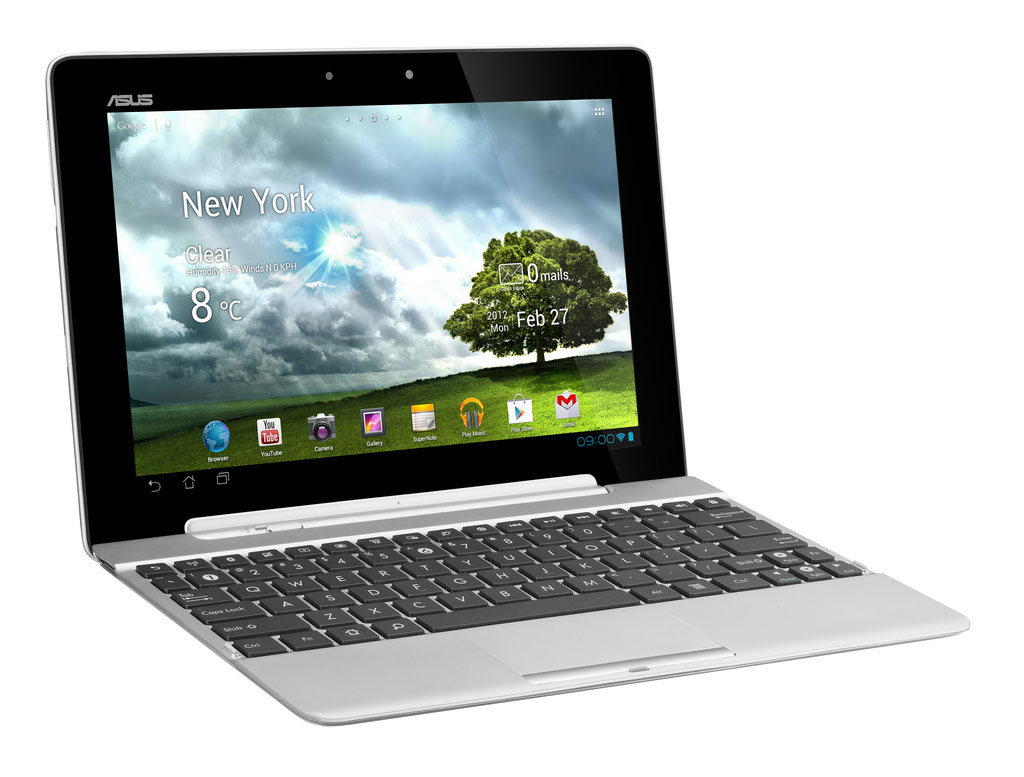

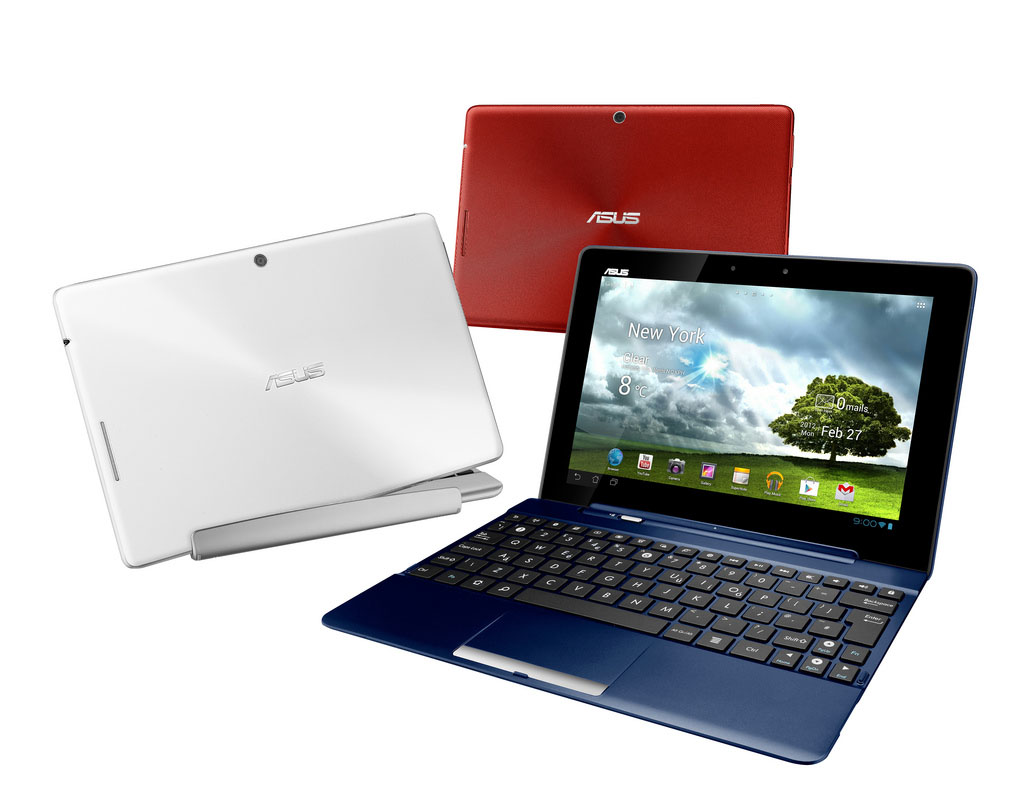
Image credit: ASUS
Wow! Renai actually liked an Android tablet! Never saw this day coming…
Should go out and check the temperature in hell or something! ;-)
you cant compare an appliance (ARM / Android / iOS etc) to a PC (your mention of the Macbook Air).
They do not compete in the same market place, and when someone tries to do that you end up with unhappy customers.
Renai, you should do a story on this… the big difference between appliances and PC’s also how MS are trying _very_ hard to blur the lines.
I predict that the Surface Pro will excite a lot of people, but when they buy what _looks_ like an almost identical but cheaper and slimmer version (Surface RT) they will be very disappointed.
“…or as we preferred to refer to it, the ‘Battle Bridge’, to the main tablet unit (alternatively, the ‘Saucer section’)”
ROFL. “To bodly swipe and tap, where no-one has tapped before!”
Seriously though, Infinity Pad all the way. The display just isn’t good enough. And I JUST can’t bring myself to deal with iTunes and iOS.
An Ultrabook would be good….but not without a touchscreen and not without Win8 (being so close already). Which would put it at TWICE the price of the Infinity Pad let alone the TF300!
I bought one of the about 2 weeks ago and I absolutely love it. For me it was the ultimate device and I wouldn’t look at a tablet without a keyboard like that.
I needed something to use at uni, with long battery life and extreme portability. I also needed a tablet for the same and other reasons. This allows me to have a fairly serious unit for productivity, fun, and portability. I have a oversized, overpowered laptop for real tasks, I’d never touch a netbook with a 10ft pole these days due to the fact they have basically remained the same in all areas since they launched and UltraBooks are overpriced.
This tablet has gotten so much use out of me. I can code on the run, play games (GTA3 is amazing on this!), browse the intertubes and more.
One thing I must say I agree on is the back plastic, it is slippery and feels cheap. There is one spot just to the upper right of the middle where you can push it in about 3mm on my device. But considering it is almost the same as the Prime, at a MUCH lower price, I’m hardly complaining.
TF700 Transformer Pad Infinity is definitely the one to watch in this space… Although the price difference of USD$599 vs AUD$899 for the same 64GB version is a little hard to swallow. This is something Apple are a huge step ahead on with their near-price-parity product refresh last month, and the rest of the industry are going to have to catch up ASAP or risk losing any potential future market share to Apple (again).
Comments are closed.