

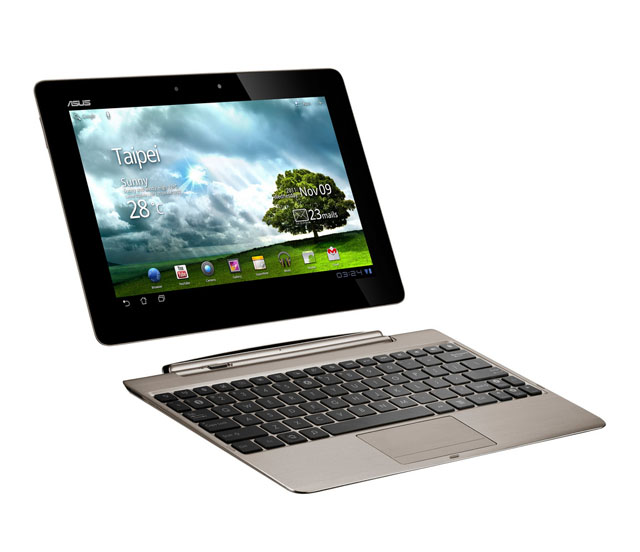
review Of all the Android tablets that came out of the last year – and there sure were of a lot of them, by our count – the ASUS Eee Pad Transformer was the only one that really stood out as something different. It was the keyboard docking station that gave it its mojo: a unique accessory that integrated tightly with the tablet to provide notebook-style computing when you needed it (and the the freedom to detach it when you didn’t), with a built-in battery to extend run-time and laptop-like amenities such as a full-sized USB port and SD card slot.
This year, ASUS has hit the ground running with a sequel that improves on the original in every way. The Eee Pad Transformer Prime is the first quad-core mobile device to hit the market, and is also the first Android tablet to come with Ice Cream Sandwich (aka Android 4.0). If you’ve been holding out on buying an Android tablet up until now, this could very well be the one that you’ve been waiting for. But does the extra power and newer operating system make Android on a tablet more attractive than it has been up until now? Is it compelling enough to get people to buy it despite rumours of an iPad 3 coming out next month? Read on to find out.
Design
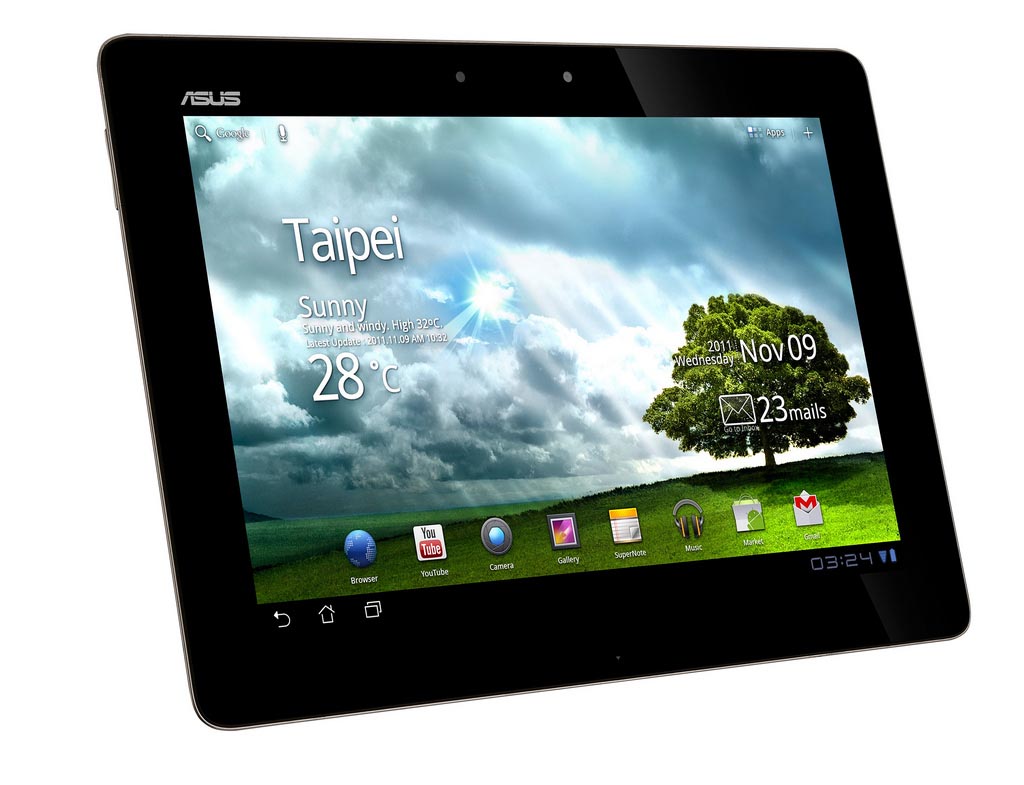
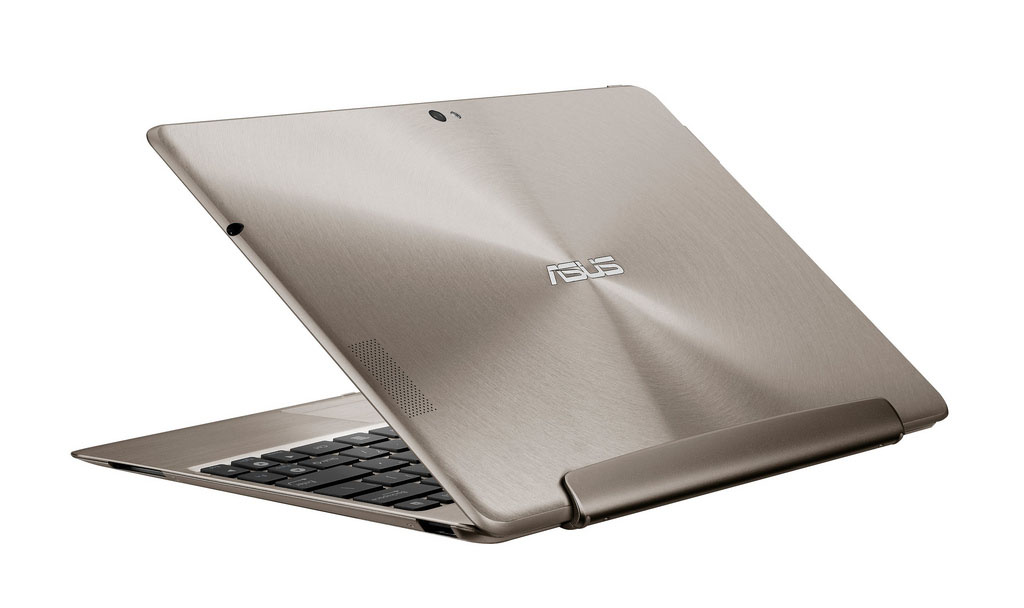
One thing’s for sure: the Transformer Prime is an absolute stunner. It’s the sort of decadent-looking device that we can imagine Kanye West using to read his email on. When it’s connected to the keyboard dock, it doesn’t look like a tablet connected to a keyboard so much as a complete notebook. In fact, it takes most of its design cues from the ASUS Zenbook UX31 ultrabook, utilising the same ‘spun metal’ finish on the lid and rear, and the same edge-to-edge Corning Gorilla Glass screen. The results are striking, especially when combined with its eye-catching ‘champagne gold’ colouring and the skinny dimensions of both the tablet and keyboard dock. ASUS has managed to make the Transformer Prime more powerful while simultaneously slimming it down, and it’s gone from a portly 13mm to a slender 8.3mm.
The Transformer Prime has tapered, almost sharp edges like the iPad 2, and while it’s not as comfortable to hold as the flat edges of something like the Samsung Galaxy Tab 10.1, we can’t argue with its luxurious look and feel. At 586g for the tablet (close to 100g lighter than the original Transformer), it’s lighter than the iPad 2 but heavier than the Galaxy Tab 10.1, although we definitely prefer the aluminium body over the somewhat cheap-feeling plastics used in most other Android tablets. The only downside to its skinnier body is that there isn’t as much room to fit buttons along the edges – as a result, the power and volume buttons are thin slivers that are uncomfortable to feel for and push.
The same ports, buttons and slots found on the original Transformer are all present and accounted for on the Prime, although some of them have shifted around. The left-hand side of the tablet houses the microSD card slot, micro-HDMI port and volume buttons, the top has the power button, the right-hand side has the headphone jack, and the bottom has the proprietary ASUS connector with holes on either side for the keyboard dock to hook into. There’s a 1.2-megapixel camera above the screen, and an 8-megapixel camera and LED flash on the back. On the keyboard dock, the left side houses the same ASUS connector (used for charging when the tablet is connected), and the right side has the full-sized USB port and SD card slot.
Features
The Transformer Prime is the first device we’ve seen that offers Nvidia’s powerful new Tegra 3 chip, which consists of a quad-core ARM Cortex-A9 processor (1.3GHz in multi-core mode and 1.4GHz in single-core mode) and a 12-core GPU. This spec alone is enough to get power users and early adopters interested, and if you believe the marketing hype, it provides a vastly superior experience for multi-tasking, web-browsing, gaming and Full HD video playback.
ASUS has also paid special attention to the screen and camera. It has the standard 10.1” 1280 x 800-pixel IPS display, but a special IPS+ mode (which you can toggle on and off) boosts the screen brightness to 600 nits for enhanced outdoor visibility. The rear-facing camera offers the same features that you’d expect in a high-end smartphone, such as an eight-megpaixel backside-illuminated sensor, an LED flash and a larger-than-average 2.4 aperture. We still think people taking photos with tablets look ridiculous, but it’s nice to have the option of high-quality stills and Full HD video when you don’t have any other means of shooting them.
Like its predecessor, 3G has been left off the menu, but you do get the standard complement of 802.11n Wi-Fi, Bluetooth 2.1 + EDR, GPS, and gyroscope. It’s also available in 32GB and 64GB storage capacities. The Transformer Prime ships with Honeycomb out of the box, but you can upgrade this over the air to Ice Cream Sandwich for a host of improvements like an enhanced multi-tasking pane, a better browser, support for Wi-Fi Direct and a nice ‘Roboto’ system font. ASUS has also added its own widgets and software on top that adds extra functions like a DLNA media server, cloud storage, word processing and data backups.
Performance
With all the hype surrounding quad-core mobile processors, we were expecting fireworks and rockets to shoot out of the tablet every time we tapped the touchscreen. But the experience of using the Transformer Prime wasn’t anywhere near as mind-blowing, and frankly, we were left feeling disappointed. When it’s fast, it’s really fast, and some of the things that used to lag on dual-core Honeycomb tablets (like bringing up the multi-tasking pane, swiping through the homescreen, unlocking it and loading photo thumbnails in the Gallery photos app) were swift on the Transformer Prime. But there were just as many things that performed at the same speed as older tablets, making us wonder whether Ice Cream Sandwich is actually optimised for quad-core processors.
But that wasn’t even the worst part. The bigger let-down was how flaky the Transformer Prime was for day-to-day use. It randomly rebooted a handful of times, and frequently gave us ‘[application name]’ is not responding’ errors – particularly when we were using the browser. A lot of the time, it didn’t even feel like a dual-core processor, let alone a quad-core one, as it would regularly lock up when doing one task (such as installing an app or loading a webpage) and ignore any other input attempts until it was finished.
At the very least, web browsing performance has seen a noticeable improvement. We were able to compare the Rightware Browsermark scores between an ASUS Eee Pad Transformer running the latest version of Honeycomb, an ASUS Eee Pad Transformer Prime running Honeycomb, and an ASUS Eee Pad Transformer Prime running Ice Cream Sandwich. The original Transformer got a score of 81,642, while the Prime running Honeycomb got 92,047. Naturally, the Prime running Ice Cream Sandwich got the best score of all at 109,925.
Another way the Transformer Prime one-ups its predecessor is by supporting Full HD video playback. We’ve been promised this capability before on dual-core smartphones and tablets and have almost always been let-down by the experience (the exception is the BlackBerry PlayBook, surprisingly), but the quad-core processor on the Transformer Prime was able to pull Full HD video playback off extremely well. It doesn’t have native support for MKV video files, so we had to test it using the third party Dice Player. It was able to play our 1080p video files almost completely smoothly; it dropped frames occasionally, but not enough to be irritating.
There are a few games in Android Market that are either specifically for Tegra 3 devices or offer extra visual effects. One of the latter is Shine Runner, and we used it to compare the graphics between an ASUS Eee Pad Transformer and an ASUS Eee Pad Transformer Prime. The game played just as smoothly as on the original Transformer as it did on the Prime, but the water looked a little more realistic and you get a couple of extra effects like water splashing onto the screen. ShadowGun THD, which is a version of the game specifically for Tegra 3 processors, showed a more dramatic difference on the Transformer Prime, with graphics that looked far more detailed and nuanced. It’s still not quite Xbox 360-level, but it’s close, especially once you pair it with a PlayStation 3 or Xbox 360 controller – both of which are supported natively in Ice Cream Sandwich.
And finally, there’s battery life. ASUS has added three different power modes that you can toggle through using the notification drawer in Ice Cream Sandwich: power saving, balanced and performance. We used the balanced mode first, and set screen brightness to 50% (using the standard IPS mode rather than the IPS+ mode) and turned Wi-Fi on. With a loop of movies set to play continuously, the tablet lasted for 7 hours and 4 minutes, at which point we plugged it into the dock. It then ran for another 5 hours and 9 minutes by sipping the dock’s battery, adding up to a total of 12 hours and 13 minutes. We then switched to power saving mode to see whether it would make a substantial difference to power consumption. Under the same test conditions, the tablet on its own ran for 7 hours and 50 minutes, or 46 minutes longer than it did on balanced mode.
Conclusion
Based on the lag and stability issues that plague the Transformer Prime, we get the feeling that ASUS rushed the Ice Cream Sandwich update out just for the privilege of being first to market. What we’ve ended up with, then, is a beautifully-designed, extremely powerful tablet that fundamentally fails to deliver the performance improvements we were expecting. Yes, gaming and video playback is better, but performance for everyday usage actually seems to have gotten worse in some areas, and we can see a lot of unhappy customers kicking themselves over not having gone the more sensible route of buying an iPad 2 or waiting for the iPad 3.
Given ASUS’ past, exemplary track record at delivering prompt over-the-air software updates for the original Transformer, we’re optimistic that the problems will be ironed out fairly soon, That said, we’d recommend waiting until this update is actually available before buying it. The Transformer Prime definitely has the lust-factor down pat, but the irony is that it doesn’t appear to be ready for ‘prime time’ just yet. The ASUS Eee Pad Transformer Prime is available for $799 for the 32GB version and $899 for the 64GB version, both of which come with the keyboard dock as standard.
Jenneth Orantia turned her back on a lucrative career in law to pursue her unhealthy obsession with consumer technology. She’s known for having at least half a dozen of the latest gadgets on her person at a time, and once won a bottle of Dom Perignon for typing 78WPM on a Pocket PC with a stylus.
Image credit: ASUS
thanks Jenneth – seriously looking at this on the basis that ASUS will patch the bugs. Anyone buying these form the USA (and paying $US500 + shipping, rather than $AUD800)? Where?
I looked into it but decided to buy it locally. The $500 US price tag does not include sales tax (approx 7.25%) or the keyboard dock. So, if you add the $150 keyboard dock and then calculate the sales tax you are looking at about US$700. While the Aus$ is pretty good compared to the US$ you would probably won’t save much when you pay for shipping and insurance…and at least you’ll be able to return it if the WiFi and GPS issues turn out to be problematic for you.
Been using my newly purchased Transformer Prime all morning with no problems. But then this is my first tablet and first Android device, so I’ve nothing to compare it to.
Bought mostly for media consumption on an upcoming long OS trip with a feisty 3yo, so the main selling feature was storage expansion via SD/microSD cards.
Been using my newly purchased Transformer Prime all morning with no problems. But then this is my first tablet and first Android device, so I’ve nothing to compare it to.
Bought mostly for media consumption on an upcoming long OS trip with a feisty 3yo, so the main selling feature was storage expansion via SD/microSD cards.
Written on my TPrime (was going to write TP but I also use ThinkPads, so need a new acronym!
Any updates on the whole rooting saga that Asus brought upon itself with this unit?
I was thinking of getting this but there’s a new 1 coming out later this year apparently
I just got an Asus Transformer Prime, and had none of the random rebooting issues you speak of, did you update the tablet to the latest version
I think this may be an exception, not the rule
According to the documentation, the latest update supposedly fixed the random rebooting and many other issues. I’ve not experienced any such problems since I purchased last Sunday. Very happy with my Transformer Prime so far. Haven’t let my 3yo play with it yet though – so the real test is still to come!
Yeah my transformer prime has so far been perfect
Thanks for the writeup Jenneth.
Was contemplating purchasing this for a 4 1/2 hr trip with a 5yo and 2yo but was unsure. Your review has made me swing towards waiting for the iPad 3 – only a couple more weeks according to the rumours!
Wish I had read your review before purchasing the Prime. I’m experiencing frequent reboots and application lock-ups and have reverted back to my clunky old Galaxy Tab 7″ which, despite its small screen and sluggish single-core processor, is at least reliable for most tasks. Also, I have yet to see the latest update (9.4.2.15) appear as a firmware option so I have no idea if that will fix the problem. Very disappointed and frustrated with Asus at the moment.
Comments are closed.