

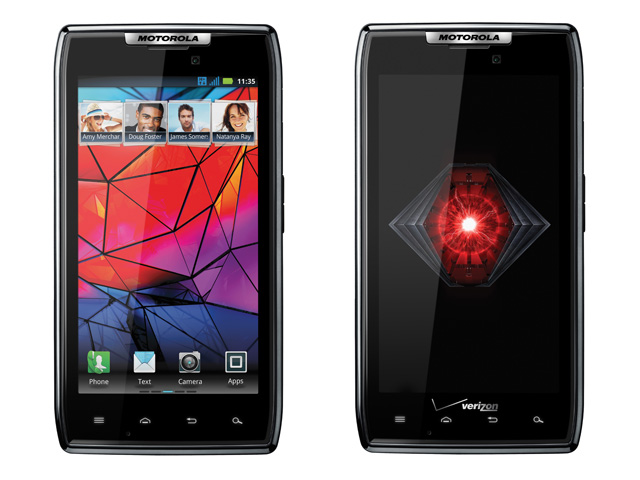
review It’s back! Motorola’s famous RAZR, the ‘it’ phone that predated the iPhone by three whole years. You had to have owned at least one of them – Motorola certainly flogged enough variations of it before finally (and perhaps blessedly) killing the brand off in 2007.
Competition is pretty fierce in the smartphone space right now, and Motorola has yet to bring out a hero device that successfully competes with the flagship phones from other vendors. Bringing the company’s most iconic phone brand back is a smart move, but it will make as big of a splash as the original RAZR? Read on to find out.
Design
If you’re expecting something that actually looks like a RAZR, ie clamshell form factor, aluminium-clad body and that Tron-like metal-etched keypad, you’ll be disappointed. The new RAZR has more in common with Motorola’s less well-known SLVR, which was a candybar phone that was super-skinny for the time at 10.2mm.
The RAZR is even skinnier at 7.2mm, officially making it the thinnest smartphone so far, although Motorola has cheated a little by having a small hump at the top (housing the camera, speaker, and microUSB and microHDMI interfaces) that sticks out by 11mm. At the same time, the RAZR is extremely wide at 68.9mm, so it’s not the most comfortable phone to grip.
One thing the RAZR isn’t is flimsy. There’s a KEVLAR fibre coating on the back, Corning Gorilla Glass on the front, and diamond-cut aluminium accents throughout. Inside, there’s a stainless steel core and frame to prevent the phone from snapping. A splash-guard coating on the outside is designed to repel water and moisture, although it’s not waterproof or IP67-rated like the Motorola Defy.
Features
The RAZR has a lot in common with the popular Samsung Galaxy S II. Both run Android Gingerbread, are powered by dual-core 1.2GHz processors and 1GB of RAM, come with 16GB internal storage plus microSD expansion, and have eight-megapixel cameras and 4.3” Super AMOLED displays. But there are some slight differences that tip the balance in the RAZR’s favour: it runs the newer 2.3.5 version of Android out of the box (with minor extras like video capability in Google Talk), has a higher qhD (960 x 540) resolution and comes with a microHDMI port built-in.
The RAZR’s screen deserves special mention. After experiencing the superlative Super AMOLED Plus display of the Galaxy S II and the roomy qHD resolution of the HTC Sensation, we longed for a screen that combined both of these attributes into a single 4.3” display, and this is exactly what the RAZR offers. We haven’t been able to get an answer from Motorola as to how the RAZR’s Super AMOLED Advance technology differs from Samsung’s Super AMOLED Plus, but we picked up a few differences by sitting the two side-by-side.
We preferred the colour reproduction on the RAZR, as the colours are warmer, with purer whites and more natural-looking greens, without the bluish cast that plagues the Galaxy S II. However, the Galaxy S II is able to display more details, despite having a lower 800 x 480 resolution. We were able to make out the texture of a baby’s face and the pattern on a black bag, neither of which was visible on the RAZR’s display. But it’s only noticeable when you view photos and movies, and even then, only when you compare the same media to the Samsung’s screen. Overall, we were happy to sacrifice those extra details for superior colour fidelity of the RAZR’s display.
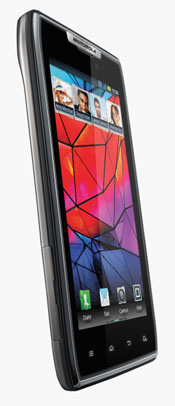
When to comes to actually using the phone, however, we preferred the Galaxy S II. Motorola has never been very good at software (remember the torturous interface on the original RAZR?), and the GUI and software additions that have been added on top of Android, such as icons, widgets, launcher and custom apps, lack the polish and visual appeal that we’ve gotten used to in smartphones from Apple, HTC and Samsung.
Eye candy aside, there are a few things in the RAZR that you won’t find in other Android smartphones The Gallery app can display photo albums from multiple online services like Facebook, Flickr and Photobucket, and there’s a Smart Actions app that lets you automate everyday tasks and maximise battery life (similar to the third party Tasker app). There also a bundled MotoCast app that works well for streaming and downloading your files and multimedia from your desktop over 3G or Wi-Fi.
Performance
Before we jump into the RAZR’s performance, we should note that our review unit was running pre-production software, so the benchmark scores and bugs we encountered may not be same as on the shipping units.
In day-to-day use, the RAZR was quick for most things, but it lagged in a few key areas. The preloaded Swype keyboard (which is active by default) was occasionally sluggish, and more than a few times we had to press letters three or four times before the keyboard caught up. There’s also a slight delay when you move from the homescreen to the apps launcher and when bringing up the multi-tasking window – complaints that may seem petty, but when you do it dozens of times a day, it’s a lag that gets old very quickly. The camera is slow to start up as well, notwithstanding the fact that there’s a shortcut to get to it from the lockscreen.
The benchmark results match our initial impressions of the Galaxy S II being the faster phone. Quadrant, which measures CPU, memory, I/O and graphics performance, returned a score of 2483 for the RAZR, which is well below the Galaxy S II’s score of 3131 – but still a lot higher than other phones in this class like the HTC Sensation and HTC Evo 3D. Surprisingly, the RAZR did better than Galaxy S II when it came to the SunSpider 0.9.1 JavaScript benchmark, which measures real-world usage of JavaScript on websites; the RAZR returned a score of 3304ms, and the Galaxy S II lagged behind at 3601.5ms. For laughs, we loaded the SunSpider benchmark on the iPhone 4S as well, and this trounced both Android smartphones with a score of 2222.7ms.
The RAZR’s call quality is above average for a smartphone. The earpiece is loud enough to hear in noisy environments, and it produces reasonably clear, if not occasionally crackly, voice quality. While it’s exclusive to Optus until next year at least, it supports quad-band 3G, so it’ll also work on Telstra’s and Vodafone’s 850MHz networks. Its main weakness is the low volume of the speakerphone – even at the maximum setting, we struggled to hear callers while we were driving, and it’s even harder to hear when you’re in a public setting. This shortcoming is puzzling given how loud and powerful the speaker is when you’re playing music and movies.
One of the concessions that Motorola had to make in getting the RAZR so skinny was opting for a sealed battery. Thankfully, it’s a good-sized 1780mAh battery, and we were able to get close to 26 continuous hours of medium usage before it ran out of juice. You’ll be able to squeeze even more out of the battery by taking advantage of some of the power-saving settings in the Smart Actions app. It also uses the smaller microSIM format, making it the third smartphone now that uses one, after the iPhone 4 and the Nokia N9.
Conclusion
The new-age RAZR may not be a game-changer like the original, but it’s nevertheless one of the most impressive smartphones we’ve seen yet. It has the best screen currently available on a mobile device due to the triple threat of the 4.3” size, qHD resolution, and Super AMOLED Advance technology. It packs all the latest technologies like a dual-core processor, eight-megapixel camera and microHDMI, and Motorola has confirmed that it will be offering an upgrade to Android 4.0 (aka Ice Cream Sandwich) sometime next year. And despite being the world’s thinnest smartphone, it’s remarkably durable.
Is it better than the Galaxy S II that it seeks to emulate? We’re not so sure. It does a few things better, but overall, the Samsung Galaxy S II offers a better experience. The RAZR may be thinner, but it’s also wider to the point of being awkward to hold, and in day-to-day usage, you tend to notice the latter far more. The Samsung also feels far more responsive; its TouchWIZ UI isn’t our favourite Android customisation, but it’s laughably better than Motorola’s software.
The RAZR is available from today exclusively through Optus for $0 on the $59 Optus Cap Plan. If you get it on the $79 cap, you get a bonus ‘Work, Play and Drive’ kit.
Jenneth Orantia turned her back on a lucrative career in law to pursue her unhealthy obsession with consumer technology. She’s known for having at least half a dozen of the latest gadgets on her person at a time, and once won a bottle of Dom Perignon for typing 78WPM on a Pocket PC with a stylus.
Image credits: Motorola
They can’t call it a RAZR! It doesn’t bend in the middle!
That was also my first reaction :)
Though, come to think of it, there is probably “some way” you could make one “bend” in the middle…
Sounds like this has to be made into a YouTube video :)
It’s called the Razr because it’s thin, not because it ever bent in the middle
Thanks for a very good review.
I agree with nearly everything mentioned here, but would like to add a few things:
Firstly, the Gingerbread browser is single-threaded, meaning that it can only use one of the two cores. This has been rectified in Honeycomb and Ice Cream Sandwich, so once you see ICS running on these phones (or on the Galaxy Nexus), the Sun Spider benchmarks should look very different.
Also, since you are now dabbling in benchmarks, please note that Quadrant is an extremely old and out-dated benchmark that doesn’t resemble anything in real-life usage. Something like Rightware Browser Mark is much more indicative. Also, this and the Galaxy SII might both on paper have a 1.2 Ghz dual core processor, but they have very different GPUs (Mali-400 vs PowerVR 540). It would be good if you could also test the GPU of the phones, using something like GLBenchmark (which also runs on iOS).
The only other niggling complaint I have is your battery test. It would be best if you could quantify your usage when stating battery life. “Medium usage” is very vague and subjective, and doesn’t really tell the reader what you’ve been doing with the phone. Personally, I doubt any smartphone would last 26 hours in my hands based on my “medium usage”. Something like “1 hour of web browsing on wifi, 1 hour of 3G browsing, 5 phone calls, 10 text messages, while screen brightness was set to 80%” is far more informative, and would tell a potential buyer how much battery life they can actually expect from the device.
All in all though, a very good review. Thanks for Jenneth, Delimiter is becoming a respectable place for Aussie reviews of smartphones.
Thanks for your feedback, Aryan, really helpful!
You’re right re Quadrant, I’ve been looking around for a better benchmark, but I was kind of stuck using the old one so I could continue to compare the results with previous smartphone reviews. I’ll look into using the one you mentioned though.
Another good idea re quantifying battery life. I’ll give it a go for the next review :)
I’ve just had a look at GLBenchmark – which test should I run?
If you run the GLBenchmark 2.1 “Egypt” test, and run it at the same resolution for all devices (say 1280×720), that is the single most indicative test about GPU in a smartphone/tablet.
It is not a silver bullet, it is a “geometry based” test, which means it favours some architectures above others, but as modern smartphone games seem to be mostly geometry based, it is a fairly good indication of how modern games run on a smartphone.
I just ran SunSpider on my Asus Transformer (1ghz Dual Core Tegra 2, running 3.2.1).
That is, Aryan mentioned the stock browser is multithreaded, and this is a comparitive benchmark on (basically) default settings.
I ran it 3 times, first run was 2187(+-0.3%), second was ~2260 (+-3%), third I force-closed google+, facebook and a couple other background processes, and ran the benchmark again: 2122 (+- 0.4%)
I think we can basically call these benchmarks: “Equivalent to iPhone 4S”.
I am now *very* interested to see the benchmarks of these 1.2 and 1.5ghz dual core phones running a multi-core browser. We should be seeing some sub-2000 range tests!
(as an aside, my hp laptop, 2630-QM, quadcore mobile processor 2ghz = 245ms in sunspider – we aren’t replacing our desktops yet!)
Interesting review and follow up comments.
I thought it was quite strange that the review noted the Samsung Galaxy S II’s WVGA S-AMOLED Plus screen displays more detail than the QHD screen on the RAZR.
I realise a number of hardware and software factors could be attributed to a perception of higher detail on a lower resolution screen, but do you think this could indicate that the RAZR has a pentile screen? It’s my understanding that the pentile screens actually cheat with their listed resolution and/or pixel density, by having a honeycomb like structure of pixels, and counting seperate RGB sub pixels to achieve a higher pixel count. My old HTC Desire had an 848×480 pentile screen and I hated it. The crosshatch like pattern really ruined what was otherwise a decent AMOLED screen.
I think the “Plus” part of the SGSII means it’s the real deal with no pentile arrangment (true 848×480 with all the other benefits of S-AMOLED) where as I’m wondering if this QHD S-AMOLED screen of the RAZR is of the pentile variety? (just like the upcoming Galaxy Nexus which dissapointingly has a pentile 1280×720 screen).
Pixel density is becoming more and more important with mobile screens, so mentioning whether a screen is pentile or non-pentile when talking about it’s picture quality is probably a good idea in reviews as well.
Yes, the RAZR does have a PenTile matrix screen, unlike the SGSII. The RAZR has a ‘SAMOLED Advanced’ screen, which no one quite knows what it is yet, but it’s confirmed to be PenTile matrix.
PenTile is no ‘cheating’, it’s just a different method of manufacturing which does have its advantages (battery life and manufacturing cost). Admittedly it does negatively affect the sub-pixel quality.
There is also difference between RGBG PenTile and RGBW PenTile.
I believe the first generation SAMOLED screens (like the one in the original SGS or the AMOLED in HTC Desire) were a particularly bad example of the technology. As for the Galaxy Nexus, the jury is still out but early reviews of it and the Galaxy Note (which also has a PenTile 720p resolution on a 5.3″ screen) mention that at that resolution and with a PPI so high, PenTile doesn’t matter anymore. Once the human eye can’t distinguish between individual pixels anymore, PenTile starts to look very appealing.
Thanks for the clarification Aryan. I’ll certainly be interested to check out these new 4.65″ 720p screens to see how they compare to Super LCD 1280×720 screens of the same size. S-AMOLED obviously kills LCD with black levels and contrast ratio, but sometimes I find the colours are a little over-saturated and unnatural looking on AMOLED screens. I guess a lot of that comes down to the colour temp though, and how the manafacturer has tweaked visual settings.
Even at 4.65″ 720p, LCD might still hold the advantage of a true 316ppi count, where from I’m reading pentile layout can give the appearance of lower pixel density, so I guess we’ll have to wait and see and let our eyes be the judge.
I’ll also be interested to see how the retina display of my iPhone 4 holds up to these next gen screens. Although only 3.5″ (it’s looking smaller and smaller to me all the time :( ) with a ppi of 326 it’s been the best looking mobile screen out there for 18 months now, so its about time Android took the resolution/pixel density crown :)
Some further info on the RAZR’s screen: http://www.theverge.com/2011/11/8/2547725/a-closer-look-at-the-droid-razrs-screen
Funny, I didn’t notice a green tint at all on the RAZR’s display.
You did however note the appearance of higher detail on the SGS2’s lower resolution screen, which is exactly what The Verge has backed up. Great comparison shots that Nilay added too. And my favourite bit as an iPhone4 owner – “And man — the iPhone 4’s display remains in a class of its own” – It certainly does! I still have my doubts that a 316ppi 720p pentile screen, like on the upcoming Galaxy Nexus, will match or better the iPhone 4’s 326ppi IPS display too.
Comments are closed.