

review Lenovo’s ThinkPads have long been somewhat of a standard in the corporate world, with countless workers relying on the laptop line to get them reliably through the work day and beyond. But has the ThinkPad’s reputation for stellar build quality and solid performance translated through to its newest top-end model, the X1 Carbon? Read on to find out.
Design
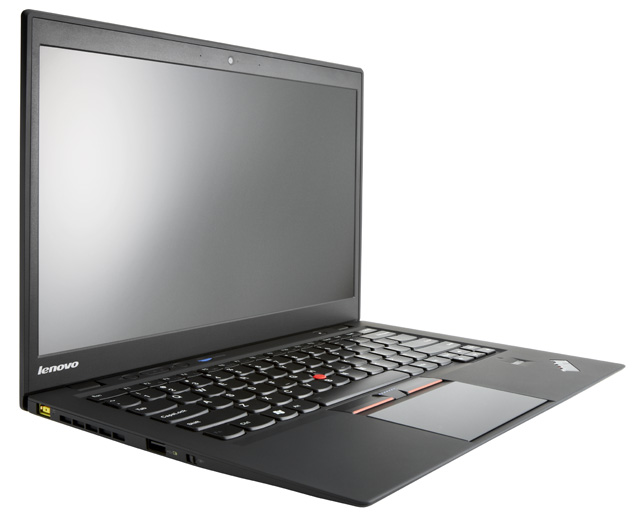
If you’ve seen one of Lenovo’s thin and light ThinkPads, then you’re probably familiar with the line’s fundamental aesthetics, and if you’ve seen one of the company’s ThinkPad X1 models (released mid-2011), then you’ll pretty much know exactly what you’re dealing with here. The typical ThinkPad is a lovely slab of matte black, grippy plastic, and the Lenovo ThinkPad X1 Carbon’s no exception to this rule. In addition, the Carbon variant of the line looks very similar to the previous vanilla X1 – but constructed with robust but light carbon fibre.
The lid of the X1 Carbon has the basic Lenovo and ThinkPad branding, plus a couple of small lights indicating when the laptop’s battery is charging and when it’s asleep. Underneath, the model has the usual four little ‘feet’, plus an extensive series of fan vents which can get a little hot when the X1 Carbon’s under extended load. On the left-hand side sits a charging input, some more open vents and a powered USB 2.0 port, plus one unusual feature – a wireless switch, which will turn off all transmitting and receiving functions of your laptop (such as Wi-Fi, for example) to save battery life.
On the laptop’s right-hand side sites an SD card reader, a 3.5mm headphone jack, a mini DisplayPort outlet, a USB 3.0 port and one of those handy security slots which let you chain your laptop to your desk. On the back of the X1 Carbon sits a 3G mobile broadband SIM slot.
When you open the lid of the X1 Carbon (which is pretty seamless and easy to do, unlike some laptop models we’ve tested), the model’s 14” screen opens up. It takes up most of the display space possible, but there’s a “720p HD webcam” model sitting above it, and some logos below. On the actual body of the laptop sits its full-size keyboard in hard, chiclet-style plastic, with a decent-sized trackpad with three adjacent buttons. The keyboard has one of the little nodules embedded between the G, H and B keys which can be used to control the X1’s mouse. Only a few companies still include these nodules in their laptop design, and we have to admit we hate them, but some still swear by them, including many amongst Lenovo’s user base.
To the right of the trackpad is a fingerprint reader, while above the keyboard, just below the screen, sits a mute button, volume controller buttons, a microphone on/off button and the ThinkVantage button, which gives one-touch access to additional bundled Lenovo software. There’s also a power button to the right, which glows green when the laptop is in use.
The X1 Carbon measures 33.1cm by 22.6cm by 18.9cm, and it weighs 1.36kg. That’s pretty comparable to Apple’s 13” MacBook Air, at 1.35kg, but obviously the Air is composed of aluminium and not Carbon fibre as the X1 Carbon is. Lenovo says the carbon fibre is as strong as aluminium, but at one third the weight.
Overall we really like the ThinkPad design (we’ve been a huge fan of it over the years), and the X1 Carbon is pretty much the penultimate example of that design. Matte black everywhere with red highlights, lovely smooth keyboard keys and a silky trackpad, with strong build quality in the hinges. And we love the fact that the X1 Carbon is so grippy. You don’t want to go dropping your laptop.
This whole machine screams “build quality”, and if you pick it up and play with it, you’ll probably be as immediately impressed as we were. It’s cool and professional, but at the same time lovable, comfortable and a little cuddly – the perfect model to watch movies in bed with.
Features
The X1 Carbon comes with a third generation Intel-Core i5 CPU. It’s a i5-3427U mode, running at 1.8GHz. Our model came with 8GB of DDR3 memory running at 1333MHz, which is more than enough for almost any purpose – in actual fact, for normal daily business use, we think 4GB is more than enough for almost any purpose – and the graphics card is listed as an Intel HD 4000 model. The X1 Carbon’s display is a 14” model with an anti-glare screen which can go up to a resolution of 1600×900, at a brightness of 300 nits.
The SD card slot is a four in one card reader, and Lenovo’s specifications page appears to show that the X1 Carbon can come with eight a 128GB SSD hard disk or a 256GB SATA3 model. Ethernet is done by USB dongle, which we don’t consider to be ideal, but obviously the X1 Carbon supports all the popular 802.11 Wi-Fi variants, which is how we expect most people to be connecting to a network with it.
Audio is through the Dolby Home Theater v4 standard, according to Lenovo, and Bluetooth 4.0 and Ericsson 3G mobile broadband can also be added on, but in this age of constantly upgraded 3G/4G networks, we expect most Australians to just connect a USB dongle from their local carrier, or tether the X1 Carbon to their 3G/4G Wi-Fi unit or smartphone to get network access outside Wi-Fi zones.
Some of the X1 Carbon’s most interesting features are non-standard for laptops these days. For example, its battery life is rated at up to eight hours, but it also has a ‘RapidCharge’ feature which can recharge 80% of its battery life in 35 minutes. The power cord itself has a bit of a brick attached, but it’s not too large.
We’ve already mentioned the switch that turns off certain input/output functionality to save battery life, and the X1 Carbon also has an ‘InstantResyme feature which Lenovo says allows it to wake from hibernate mode “nearly four times faster” than other laptops. In our experience this doesn’t mean a whole lot compared with MacBooks; it seems mainly designed to get around the limitations of Windows, which has never been a great hibernator. One other interesting feature is the X1 Carbon’s support for the vPro remote manageability standard, and it also comes with dual-array microphones and keyboard noise suppression, for what it’s worth.
Overall the X1 Carbon’s featureset is very strong. Unlike most other companies, which tend to implement fairly standard laptop features in most of their models, Lenovo is actually innovating with the ThinkPad X1 Carbon (and the X1 before it), stripping out a number of unnecessary legacy features such as VGA video output ports, PCMCIA and even parallel ports (don’t laugh) and replacing them with useful features generally not found on competing models. Aside from Apple, right now I’d say Lenovo is one of the companies innovating most strongly in laptop design, and Lenovo is a fair bit more functional and less minimalistic about how it approaches the area than Apple.
Performance
In pretty much all areas, the X1 performs very strongly.
The Core i5 CPU isn’t the fastest at 1.8GHz, and it doesn’t have the quad-core functionality which many desktop PC users have gotten used to. But to be honest, gigahertz speed ratings are not the bee’s knees anymore in CPU design, with the common PC processor having evolved quite a bit over the past few years. In addition, the X1 Carbon’s not a video editing machine; it’s primarily aimed at being a highly multi-functional laptop which can be toted around anywhere or even parked on a desk for long periods by information workers – those who work primarily on a computer and need to have meetings in offices or on the road.
In our testing, the X1 Carbon’s processing power was more than capable of fulfilling this function, and it’s capable of running the usual half-dozen apps simultaneously and even keeping up while you’re also playing a HD video from YouTube in the background. Don’t worry about the X1 Carbon’s processing power — it’s more than decent to handle almost everything you can throw at it from a day to day perspective. And if you need video processing power, you already know to look elsewhere.
The X1 Carbon’s battery life is also strong. I own an 11” MacBook Air, and I’m always having to recharge it as I watch video in bed at night. But despite the fact that the X1 Carbon has a larger screen, it took a lot longer watching HD video on it before it needed to be recharged – and when I did need to recharge it, it recharged fast. I think you could probably get a full day’s work out of the X1 Carbon on many days, but you’d probably need to keep your charger handy by the end of it – which isn’t normally an issue in Australia. There are usually power points around ;)
I really like the X1 Carbon’s RapidCharge feature. It just races through the battery recharge cycle to the point where you’re reassured that it’s not going to die on you in the next hour or so. It’s a huge confidence booster. As a journalist, sometimes you’re only at a press conference for half an hour, then out the door for much of the rest of the day. It’s nice to know you can quickly start charging a laptop during a normal length meeting and then get back out with enough juice to keep it going for quite a while.
However, we should mention that some other review outlets such as Engadget, aren’t as OK with the battery life as we are, and have done more consistent tests over time with a range of laptops than we have. Engadget rated the X1 Carbon’s battery life as “on the underwhelming side of average”, but also praised the RapidCharge feature.
The keyboard and trackpad are amongst some of the best we’ve ever tested, and we’d have no hesitation using them both full-time.
The sound quality of the X1 Carbon’s speakers was decent if not spectacular. The screen is clear and bright (we especially like the anti-glare feature, which means you won’t get a headache from using the X1 Carbon outside close to sunlight), but we weren’t huge fans of the fact that you can see the pixels on the X1 Carbon’s screen if you squint close enough. The extremely high pixels per inch rating on smartphones and tablets these days has spoiled us on laptops, and we agree with Apple that it’s time to start porting that kind of functionality to laptops. Having said that, very few people will complain about the X1’s screen – it’s very nice.
Probably the only thing which we hated about the X1 Carbon is the bloatware which Lenovo bundles with the laptop. It’s not as if Lenovo has bundled third-party security packages with the X1 Carbon, but it has bundled a dozen or so of its own utilities with the laptop, and to be honest we just didn’t know or want to care about most of the ‘additional functionality’ which they claim to deliver to this strong hardware package.
Pressing the ThinkVantage button at the top of the laptop’s screen, for example, bring up a complex custom Lenovo series of icon menus which look something like a cross between a BIOS interface and Windows XP, and mimic much of the basic functionality already provided through the highly capable Windows 7 operating system. And if you browse through the ‘uninstall app’ section of Windows’ Control Panel, you’ll find several dozen items which you probably won’t recognize. I’ve been building Windows PCs for a decade now and I had no idea what most of them did. In normal use of the X1 Carbon, I didn’t see the need to find out.
I suspect long-time ThinkPad power users will be much more familiar with some of this stuff, and it should be noted that the custom Lenovo software generally doesn’t force itself in your face, unlike the crapware bundled with many other manufacturers’ machines. But that doesn’t change the fact that it’s there, running on your machine, and relatively unexplained. We vote ‘no’.
Conclusion
Overall, we really liked the X1 Carbon, and we think almost everyone in Australia’s corporate and small business community who’s got the laptop on their ‘potential buy’ list will be pleased with it also. There are very few caveats to be added here to what is a very strongly performing Ultrabook, and there’s enough additional features that power users in particular will be attracted to this spin on the modern laptop. One item to note is that you’ll pay more for this unit in Australia than you will overseas, due to local markups on the X1 Carbon for the Australian market. Note: The configuration options in this review apply to the review model we were supplied with, but we believe various other configurations are available, as is standard with laptops.
If you’re a long-time ThinkPad fetishist, look no further. This is the new hotness. If you’re a Windows laptop user in need of a new medium-powered thin and light model to cart around with you all day, this should be one of the models you consider. And even if you’re a MacBook user, you may want to keep your options open during the next refresh cycle. The X1 Carbon is a worthy contender.
Other reviews of the ThinkPad X1 Carbon which we liked: Engadget, The Verge, CNET.
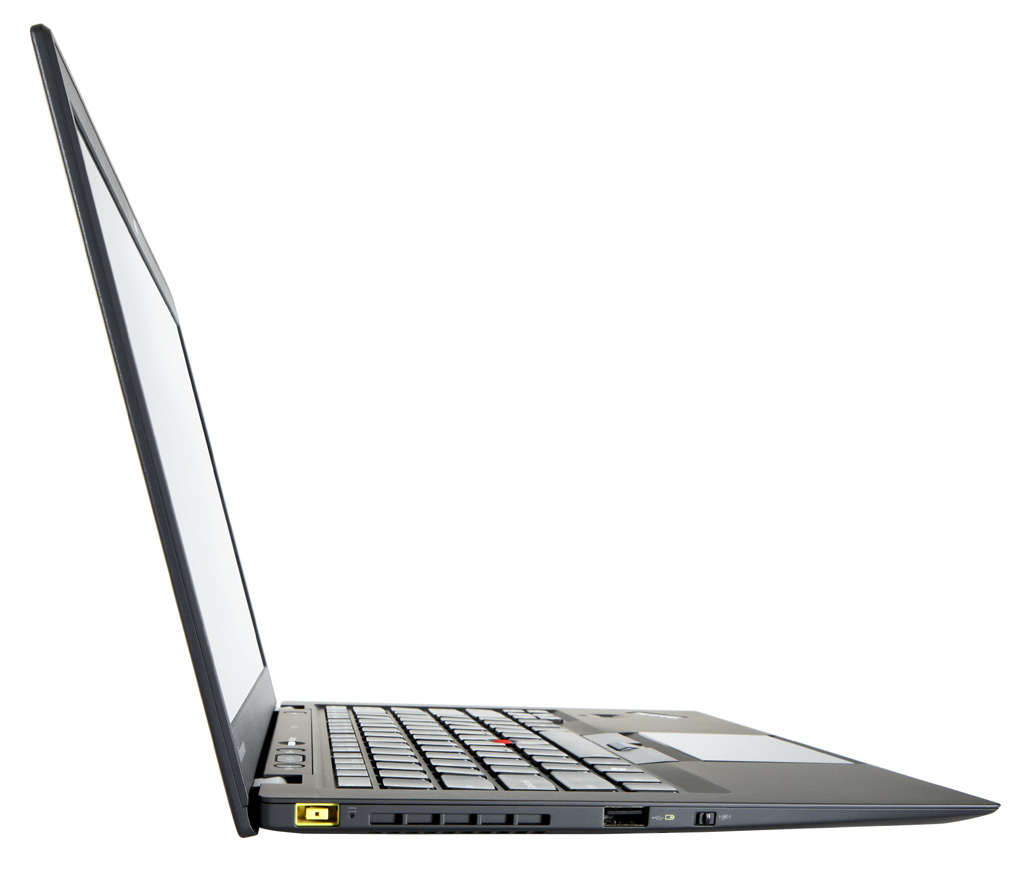
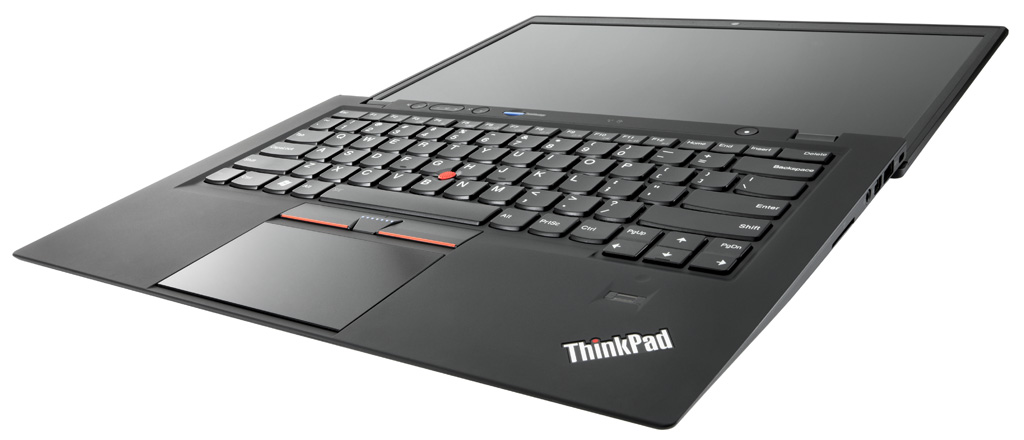
Image credit: Lenovo
Ultrabooks, to me, are terminal devices that can context switch to a real laptop as well.
My biggest gripe with my Asus UX31E is that its trackpad and keyboard suck oh so very badly. Because the buttons and the surface are integrated, now and then it mistakes my button press as a track-pad movement. This really aggravates me when trying to some last minute visio or powerpoint work on the train…
Guessing from your lack of mentioning, its not too bad?
I own the x1 carbon and the keyboard is absolutely fantastic with great feel and large keytravel. The more amazing feature is the trackpad two finger scrolling is super smooth and I enjoy using it so much i prefer it over a mouse sometimes.
Awesome Charlie.
I have ordered one for work. Taking it to China, and Singapore. Looking forward to it now :)
Comments are closed.