


review One of Optus’ first 4G-capable devices is its 4G Wi-Fi modem. It’s a neat little device designed to allow those with a need for mobile broadband speed to access Optus’ 4G infrastructure. But how does it stack up in testing? Read on to find out.
Design
At a basic level, Optus, Telstra and Vodafone tend to sell two types of devices for access mobile broadband out of the office. The first are USB-style devices which are designed to connect to your laptop. The second class, which the unit being reviewed here belongs to, is a class of stand-alone devices less than the size of a wallet which are designed to take a 3G or 4G connection and share it with a number of other devices — ranging from laptops, to smartphones and tablets — through 802.11 Wi-Fi.
Manufactured by Chinese company Huawei, Optus’ 4G Wi-Fi modem is quite typical of this second class of devices. It’s fundamentally a flat black oblong composed of smooth matte plastic on its back and shiny plastic on its front that has a few buttons and ports on each side, but nothing protruding. In terms of minimalism, this is about as minimalist as things get.
On the front of the 4G Wi-Fi modem is a small LCD screen, which displays very basic information in a limited selection of colours about its operation (such as signal strength and the number of users connected via Wi-Fi). On its right-hand side sits the SIM card slot, an on/off button and another button which will allow the WPS auto-setup standard to be used. On its left-hand side sits a micro-USB port, a ROM reset button and a microSD card slot.
And that’s about it. If this device was discovered by future archeologists it would no doubt be labelled as “mysterious black oblong of the gods”.
Features
The 4G Wi-Fi modem does just one thing: Take a 4G signal from Optus’ network and convert it into a Wi-Fi signal for the consumption of devices such as laptops, mobile phones and tablets. It supports Optus’ 1800MHz 4G network, and when that network isn’t around, it will default back to whatever speeds through Optus are available, ranging from DC-HSPA+, which is supported in some areas of Optus’ network, to the most basic GSM speeds. Optus’ 4G network allows theoretical speeds up to 60Mbps, while the other portions of its network offer slower speeds.
The 4G Wi-Fi modem can support up to five devices connecting simultaneously through the 802.11 B, G and N standards, and it can take a microSD card of up to 32GB for storage (connected to a PC through a microUSB cable). It is theoretically capable of a maximum of 10 hours’ working off its battery, and 360 hours on stand-by.
Performance
There are only two things you’ll really want to know about the device’s performance — how fast can it go, and how long the battery will last.
The good news is that the 4G speeds on Optus’ network are actually pretty great. Several weeks ago, we conducted a new series of tests on Optus’ 4G network in inner areas of Sydney, ranging from Randwick in the inner Eastern suburbs through to several locations in the busy Sydney CBD, and out to the suburb of Newtown in the inner West. The results of those tests are shown in the table below:
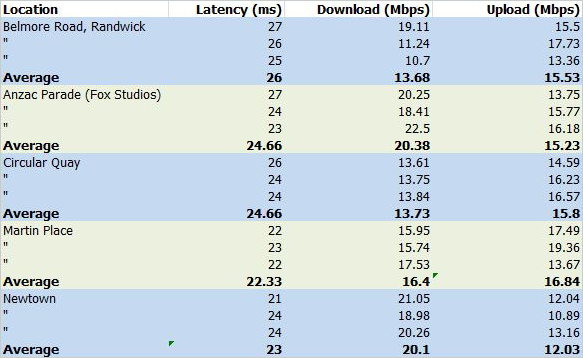
The tests were conducted using an Optus’ 4G Wi-Fi access unit, connected to a MacBook Air laptop via 802.11 Wi-Fi. The MacBook Air then used the Speedtest.net website to connect to an Optus server, and measure the results.
What they consistently show is that Optus’ 4G network infrastructure is consistently capable of providing download speeds in between 13Mbps and 20Mbps, which is close to where most Australians are able to achieve on ADSL2+. ADSL2+ tops out at 24Mbps, but most Australians are not able to achieve speeds anywhere near that level.
When it comes to latency, Optus’ 4G network provides comparable speeds to ADSL2+. For example, Delimiter was able to achieve consistent latency of between 22ms to 26ms on the Optus network, compared with 18ms on our office ADSL2+ connection. All of these speeds are sufficient for demanding time-sensitive applications such as Internet gaming.
One area which Optus’ 4G network consistently outperformed ADSL2+ was in the area of uploads. Typical upload speeds on ADSL2+ are vastly inferior to download speeds — for example, Delimiter’s office ADSL2+ connection was only able to achieve upload speeds of 0.79Mbps in testing, compared to upload speeds consistently around 15Mbps on Optus’ 4G network. If you need to upload big files, you are probably better off doing it via 4G rather than via your ADSL2+ connection — you’ll get a much better result.
In real-world user testing of applications, Optus’ 4G network also performed very well. The fast latency meant that when browsing the web on our MacBook Air, loading times were near instant for any website, and the experience felt very comparable to using an ADSL2+ connection. Delimiter was able to watch YouTube videos streaming at 1080p with no difficulty, and only a slight buffering time, as well as high resolution streaming video from StarCraft II gaming site GomTV. For a more complete overview of the speed tests and comparison with Telstra’s 4G network, see our article several weeks ago on the subject.
Secondly, there is the battery life. Theoretically, the 4G Wi-Fi modem can survive for up to 10 hours being used and 360 hours stand-by, through its battery alone. Unfortunately, we regard this claim as a little dubious.
It is true enough that the 4G Wi-Fi modem could last in the vicinity of 10 hours with moderate use, but if you’re pulling down data at a rate of knots, you’ll shave a bit off that total.
But the real problem with the battery life claims regarding the 4G Wi-Fi modem is the stand-by. 360 hours is two weeks, and in our experience the unit didn’t last that long — we’d say that if you’re using it for full days, you’ll probably need to charge it every day or just leave it connected while you’re using it, and if you’re using it in bits and pieces (say, on public transport for a bit every day), you’ll need to charge it every couple of days. We can’t see this being the sort of device which you can leave in your laptop bag for a week and expect to come back and find it still alive. The juice will have run out by then.
Having said that, given the newness of 4G chipsets and the untried nature of the platform as a whole, the 4G Wi-Fi modem actually performs really quite well on both these fronts. It offers a substantial speed boost over previous generations of infrastructure and won’t run out of battery at the drop of a hat. In terms of battery life it’s a solid performer for what it does — just not outstanding; you’ll want to keep a USB cable handy for charging.
Conclusion
Optus’ 4G Wi-Fi modem is a solid little unit that pretty much does what it says on the box. It delivers substantially improved 4G speeds in areas which support it, and it has enough battery life to last through a work day, if not much beyond that. If you want a 4G mobile broadband device and don’t want to use your smartphone as a tethering medium, we can happily recommend this unit. For $49.95 a month on a one year plan, with 10GB of data included, it’s worth the money.


Image credit: Optus
Would be good to see it in a side-by-side, battery life (and other feature – max concurrent users?) comparison with the modem supplied by Telstra (is it a Sierra-Wireless?).
(in addition to a speed comparison – which I see as less important as it is often network not wifi-device dependent)
Yeah it is hard to compare Telstra 4G to Optus 4G when you compare speed tests on a phone to a Wi-Fi tethered device.
Does Optus 4G work on your HTC One XL and if it does could you do a direct test on that device?
I unfortunately purchased this device bundled with sim card.
The optus instruction book differs in graphic detail to manufacturers ( how to insert sim)
No one by either company explains that you Do NOT remove entire new sim from plastic card! Unfortunately I removed the sim & later was told by Dick Smith Electronics & Optus store that my “sim” got jammed because I wasnt meant to remove the outer plastic from the micro sim!! Wasted $150.00 & neither Dick Smiths or Optus would replace “damaged” modem!!
Outcome: walked into nearby Telstra shop in tears, distressed, & purchased ANOTHER wifi modem with them!
From my experience, Optus are happy to take money, but wipe their hands clean of support, after sales! They lost a customer, Telstra gained one. The Telstra modem comes packaged with sim already installed!! Wish I saved $150.00 & just went with a better company and modem in first place.
Leason learned! Optus get zero stars. Telstra get 5 stars.
I’ll probably be doing the same as Jo soon. I just bought an optus wi-fi modem, only to find i cant connect to 4g unless im standing on the double white lines in the middle of my street. how usefull. anytime i want to use 4g ill have to let cars run over my modem constantly.
Comments are closed.