

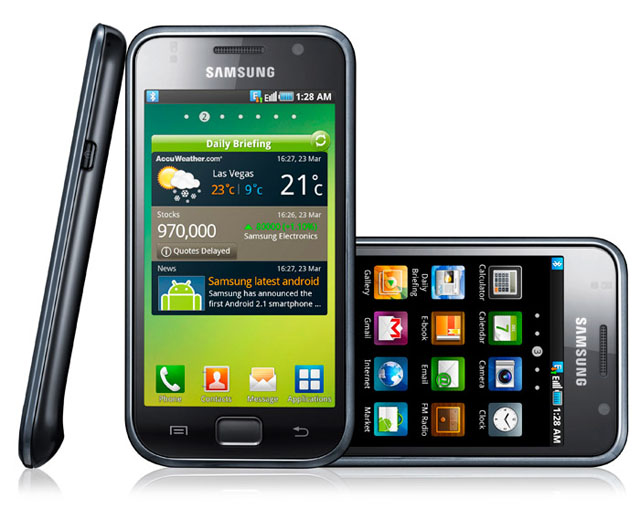
Optus’ one month exclusive on Samsung’s latest high-end Android handset, the Galaxy S, is almost over. We had just enough time to review one.
Design
The Samsung Galaxy S is a curvaceous and slender Android-based handset that was launched late June with exclusivity to Optus for a month starting July 1.
It feels wider in the hand than its Android brother, the HTC Legend (currently on Vodafone) — which we’ve also recently reviewed — but this is because the 122.5 x 64.2 x 9.99 mm dimensions have to accommodate the 4″ WVGA Super AMOLED touch-screen display, which has a resolution of 480×800. This is the same resolution as the HTC Desire — currently available only through Telstra — but with a slightly bigger physical screen size — the Desire has a 3.7″ screen.
The dark all-over black colouring of the Galaxy’s exterior evokes the thought of ink and the finish is the same sheen on the Samsung N220 netbook.
There are three physical buttons for menu, home/enter and back/return functions. Two are capacitive buttons that lightly vibrate when touched. The middle one is slightly inner-beveled. Other Android-based phones have differing numbers of buttons — sometimes a 4-button configuration, which gives more operations for navigation, or sometimes less. There is a horizontal rounded lip on the back lower section of the handset which does help with grip. It gives a good indicator of which way is up — other wise the phone would be a bit too symmetrical.
With its rounded corners the Galaxy S looks very similar to the iPhone 3GS or 3G. But the Galaxy S design has a sleeker flow to it, and the footprint of screen to frame gives the frame a tiny ratio. At 124 grams it is one of the lightest high-end Android handsets out there on the market. For example, the HTC Legend weighs 126 g, the Nexus One 130g and the HTC Desire 135g. The iPhone 4 weighs 137g.
It has a sliding USB port cover rather than the annoying “wedge the finger nail in the gap to pop the cover out” that some other handsets have and it doesn’t require the battery to be removed to change sim cards. The USB port at the top of the phone is handy if you want to to keep using the phone while it is jacked in and not have a cable connected with an awkward twist. Another nice touch is the the internal external SD card is spring-loaded, but I can see this design causing issues if any parts come loose.
Features
The Samsung Galaxy S runs on the Android 2.1 (Eclair) firmware and Samsung representatives have not responded to the question when an over the air (OTA) update to 2.2 can be expected in Australia. South Korea will receive its OTA update in August, if that is any indication for Australia Samsung users. There are 7 home screens, which is a lot of space to fill up factoring in the large screen space. The bright candy-like icons resemble the iPhone’s interface.
The Galaxy S has a ARM Cortex A8 1GHz processor, which is believed to be similar to the model used in the iPhone 4. It comes with 512MB RAM and 16GB of internal memory. 2GB of that is used for program space and the reminder is for storage — with up to 32GB of expandable memory.
GSM/EDGE bands supported by the phone are in the the 850/900/1800/1900MHz ranges. The 900/1900/2100 3G bands are supported and networks supported are HSPDA 7.2/HSUPA 5.76. Lastly, the handset can be used as a hotspot for up to five 802.11b/g/n Wi-Fi connections. The camera is rated at 5 megapixels and has digital zoom, auto focus, a focus range of 120 cm and various basic photo effects but no flash.
The camera includes a several shot modes including single shot, self shot, action shot, smile shot, continuous, panorama, beauty, vintage, action shot and cartoon. The forward facing camera has a resolution of 480 x 640 and a focus range of 22cm. The handset also does 720p high definition (HD) video recording at 30 frames per second and has HD playback and TV out.
Other features include:
- Borders’ eReader application: Through a Samsung partnership with Borders
- Samsung Dive: A location, wipe and remote lock application if the phone is lost or stolen
- Daily Briefing: Samsung’s application that aggregates stock market information, weather schedule and news to one display that takes up a whole home screen
- All share: Wirelessly connect to a Samsung TV to display videos and images on the TV. Samsung notes that games can also be displayed on the TV, with the handset being used as a controller.
Performance
The phone chugged when there was a lot of notifications on the task bar. This could be due to the Task manager and Quick Settings apps that are hooked into the notification bar. It performed better and chugged less when the Daily Briefing application was removed from the home screen.
After a search on the xda-developers forums, it looked like the having-many-applications-open-cause-lag issue may have to do with the partitioning of the internal flash memory. Methods of converting the SD partitions to ext3 are reported to have great results. Got Root?
Wi-Fi dropped out when in use, but on occasion the connection could be reset by going into the settings and turning Wi-Fi on and off. However, this method didn’t work all the time and we had to reboot the phone once to turn on the Wi-Fi back on. Other smart phones in use on the same network did not have that problem. Two consumer release Galaxy S handsets also had the same problem and it is a known issue with the community.
So it seemed that whenever intensive activity was tried over Wi-Fi — downloading games or conducting a speed test — the phone would drop out. Ultimately attempts at Wi-Fi speedtests proved futile on two different Galaxy Handsets and three different 802.11n router setups. Games and bigger applications would download on 3G but the default setting had to be overridden to allow it.
It took four to five hours for the battery to recharge via USB to 100 percent. Half of the battery was drained after half a day of intense use — backing up data, a factory reset and then reloading data. On an average usage day — a couple of phone calls, email use, Twitter and a few photo snapshots — the battery lasted a good two days. However, intense email use over a few hours will take a toll on the battery. The phone lasted a week when 3G was turned off and just Wi-Fi was used.
When side by side screen comparisons were done with other Android-based handsets from different manufacturers, the Samsung display was crisper, brighter and had greater contrast and the screen was easy to view in full daylight.
The camera worked great, nothing unusual performance wise, but playing with all the different modes was fun. The switch between video and camera mode was easier than with other handsets. Mode switch was one button press which was in plain sight on the camera interface and the button was large and easy to reach with the thumb. The face to face video call with another Galaxy S worked fine, but there was a lag of about one second.
The speaker phone quality during calls was high. For example, I tested it during a conference call interview and all parties involved were crystal clear at both ends.
Samsung Dive — which shows the location of the handset — displayed a “This service is not available in your country” error message overlaid on top of the location map when accessed. However the map was still viewable and the location was accurate down to several metres. The Samung Apps store has 6 applications available for free with more being added. Some are quite entertaining — like the racing game Asphalt 5 — and others are novel, like the RoadSms app. It uses the camera and displays the environment ahead under a transparent keyboard for texting while walking — I got a kick out of using it.
The pre-installed application Swype is worthy of a mention — it allows the user an entirely different way to input text. For example run a thumb along the keyboard in a continuous motion to input text rather than the “press key left finger press key” input method. It made texting faster and I found it more accurate than using the old method. Swype is not currently available for all on the Android market place and is only available on a few partnered handsets.
The review handset had a lot of pre-installed applications and games but it turned out a fair size of the apps and games were just links to the Optus website. The Optus application store is pointless — no worthwhile applications available and the community-based reviews were almost non-existent. The Optus application to monitor a users’ account crashed the first time I tried to use it.
Final thoughts
Overall I enjoyed using this phone and all the bugs mentioned can be ironed out in future firmware updates for basic users and/or modding for advanced users. All of the iPhone comparisons out there on the internet — and in this article — are purely superficial. Sure it has the same processor as the iPhone 4 but the operating system, other hardware features and the xda community blow those comparisons out of the water.
Samsung has an open source hub which includes open source documentation for the Galaxy S. This is a step in the right direction for Samsung. xda-developers are at hard work to optimise the the current platform and a push for Cyanogen Mod 6 to be ported has already begun.
Image credit: Samsung
Good review Jenna. I think you’ll find that the Galaxy S has been compared to the iPhone 4 on numerous occasions because they share very similar 3D graphics processors. The performance of the Samsung’s hummingbird processor is pretty much on par (possibly a little better) than the iPhone 4\Power VR combo when it comes to games. Of course having a great 3D chipset is one thing, but whether developers really utilise this (targeting solely the Samsung as other Android phones don’t have the power) remains to be seen.
You also didn’t mention that the Samsung’s OLED screen is a step above other Android handsets as it’s Samsung’s new “Super AMOLED” which is brighter and has far better legibility in direct sunlight (something regular OLED screens are terrible at).
After reading your comments and a gigantic thread at Whirlpool I’m really glad I didn’t go for this phone. It’s riddled with bugs and laggy performance issues and it’s camera and video quality leaves a lot to be desired. Same goes with the battery life. However it’s raw power is impressive (as is the gorgeous 4″ SAMOLED display) so it’s a step in the right direction and has certainly raised the bar for the next generation of Android handsets.
Hey Simon. Cheers for the props. I left out the super in “super AMOLED” – fixed now and thank you for picking up the silly typo.
The camera is pretty much standard for a lot of handsets out there – except for the Sony Xperia and the video camera was above the board.
All you imbociles who line up at these marketing hypeups dont know how stupid you look lining up for the ‘next’ apple whatever. To top it off you go onto a Singtel/optus foreign owned network thats crap!!! The sad thing is despite being “sucked” by hype you actually think you are cool! Idiots
Wow. What a helpful insightful post. Thanks for your amazing input.
“the ‘next’ apple whatever” – Obvious you didn’t read the review.
Thank you for visiting.
> Lastly, the handset can be used as a hotspot for up to five 802.11b/g/n Wi-Fi connections.
Tasty.
Good stuff – makes me wonder if Samsung actually tests its stuff before releasing it on the dirty unwashed. Some of the things you mention above suggest they don’t.
Thank you, Juha.
Hey, I wash! Bushman showers count, right?
Samsung aren’t the only ones who do this practice – intentionally or not/known issue or not – they all do it.
But you know this.
Washing means you’ll shed geek cred, but that’s OK.
On a more serious note, as you say, everyone ships rubbish. A good friend was a Nokia fanatic (yes, they exist) and coughed up the $$$ for an N97 when they first came out. He hated it, mainly because of the crap firmware/software on it – when Nokia released an update, the N97 was in his words what it should’ve been right from the start, but by then it was too late. He sold the N97 and bought an iPhone 3GS instead.
Ooh. One lost to the dark side. Lesson learned, even if manufacturers do release a faulty product it has to rectified asap instead of sitting on their hands.
Hey there, I see you’ve reviewed Vodafone’s HTC Legend as well. What phone would you recommend is better to get? Both Optus and Vodafone have them under the $49 cap and I just can’t decide.
Both are fantastic handsets but you should also look at at the HTC Desire, Sony Ericsson Xperia http://delimiter.com.au/2010/06/03/sony-ericsson-xperia-x10-review/ and the Nexus One. Look at the specs/reviews/forums and decide what you want out of a smart phone – for instance a handset with big display and a fast processor or compact and reliable.
Optus don’t let you tether on there social plans or without a fee. Not sure if thats the case with the Galaxy S. I’ve got a Legend on Vodafone and the phone itself is great and handles everything I’ve thrown at it. You can also get the Legend on a 12month contract if you don’t like being locked in for 24 months.
Tethering seems to work fine on the GalaxyS / Optus. The default Samsung app works fine. No root or any tricks required. Hopefully I won’t get charged for it outside of the 500MB data allowed.
it doesn’t use the social plan data, its in the fine print and its why i didn’t end up going with optus. Wether this is the case for android phones i don’t know
Choice review bro. If sammy are serious this time they will need to sort out the niggles before the dev community does, and keep up with htc and the googs.
Imbocile troll can’t spell imbecile.iPhone can’t spell check?
Cheers RB. Props to Samsung if they work it out before the community.
As you said they are just niggles and they will get sorted out by the community or Samsung in no time.
Great review jenna but you just made it harder for me to choose my new phone lol. I was certain the HTC desire was the winner but now after this review i just dont know. I have a iphone(peice of crap) and i really want to move away from apple. Ive read review after review and im stuck…HELP!
Thanks Johnny. Glad to see you came to a decision in the comments below.
I’m definitely getting the Galaxy S. My brother just bought one and I tested his phone out the other night. It’s the best phone I’ve ever played with and definitely kills the iphone. My only dilemma is whether or not to buy one today, or wait a week and see what deals the others will offer when the optus exclusivity ends.
Wait until June! Definitely hold out until the Optus exclusivity ends.
Im sort of new to the whole android thing so can you tell me with this 2.2 update will both the galaxy an htc desire pretty much have the same widgets and apps? Might sound like a stupid question and im sorry if it is lol.
Most Android phones have common apps / widgets, the ones that come from the android market or google. What the manufacturers will do is offer a custom user interface with custom widgets to differentiate themselves. HTC use the sense UI, Samsung use the Wiz UI. FroYo (2.2) update will come down through each vendor like HTC or Samsung over time. They will both get the same benefits that google put into froyo, such as 5x app performance over 2.1 , and each will have to update their custom UI and widgets accordingly. Froyo is out now in vanilla flavour from google, so it’s a waiting game now to see which manufacturers get it out first.
Hey RB thanks for the reply mate. I ended up going with the galaxy. My first droid phone ;) i get it next week..Appreciate the help.
No worries. It’s got a few niggly things that I think will be fixed by apps or froyo or a samsung update, otherwise a great phone. One thing I did find, when you get it maybe do a factory reset then start using it. I had wifi issues and after a factory reset it is behaving a lot better.
yeah actually i did read about the wifi thing. Ill give it a go when i get it.Thanks
Hey thats cool jenna,nice to know about the samsung store though. thanks. Its all so new to me lol. Glad i moved away from apple.
Sorry for not responding earlier Johnny – busy day. So what RB mentioned above is on the spot. Also the manufacturers also have some of their own widgets/apps – for instance HTC Peep, FriendStream for HTC and Samusngs Daily Briefing.
Nice choice going with the Galaxy, another plus with the Galaxy is that the Samsung app store provides a number of apps for free where they would fetch a pretty penny on the Android app store
Darn it…I have been reviewing phone after phone trying to decide which one to upgrade to from my trusty 5yr old clunker and seemed that the Galaxy wins hands down but after reading the issues you had I am back to where I started from.
I had considered:
HTC Desire – Telstra – $49 cap – $400 calls – 200mb data
Samsung Galaxy S – Optus – $49 cap – $420 calls – 500mb data
Sony Ericsson X10 – Optus – $49 cap + $10 – $420 calls – 500mb data
Sony Ericsson X10 – Three – $49 cap + $10 – $450 calls – 500mb data
Motorola Milestone – Optus – $49 cap – $420 calls – 500mb data
Motorola MB200 Dext – Optus – $29 cap – $150 calls – 200mb data
And ended up scoring in order of preference…Galaxy, Desire and then the Sony.
Am I wrong to now think the Desire would be the better choice?
I’ve owned a Sampsung Galaxy S for 3 weeks and it has been a big disappointment. I’ve written about it on my blog at http://sfellowes.spaces.live.com/blog/cns!66B895384B2CC7AF!816.entry
Excellent blog post Sean. Very informative and interesting analysis.
I’m really glad I didn’t buy this phone. I was quite tempted, but given I’m happy with the bumper solution I’m getting an iPhone 4. There are many drawcards to Android but there are no handsets out in Australia that are good enough to sway me yet. By the time my iPhone 4 contract runs out I’m sure the scene will be very different. Hard to imagine how good Android and Windows Phone 7 will be by then!
Thanks Simon. If this posts it will be the third attempt I have made to respond using the Galaxy S (its spontaneously reformating the page after a couple of minutes grrr). I called Optus yesterday and they are graciously waving their $80 unlock fee so I can put the handset up on Ebay. They are mailing me a free micro sim. I recently sold my 3GS in anticipation for an iphone 4 (which became a Galaxy S). I should get $400 for a 3 week old Galaxy S, which all up will cover an iPhone 4 32Gb handset from an Apple store. I cant wait to get back to a device I know is rock solid and a pleasure to use. Live and learn lol. Cheers. Sean
Hi Sean,
If you unlock your phone, I am very interested in buy it from you.
Send me an email to: emailme at renatoferrari.net
;)
So a while back i wasnt sure whether to get this phone or not and i have to say that…………….its great! Really nice phone,really fast. Can be a bit sluggish sometimes(anyone know if froyo will help this?)but honestly the lag isnt that bad.This whole android thing is so new to me. Getting the hang of it though. i have a question for samsung galaxy users…Why do apps keep running in the background after you have closed them?I had to get a task killer from the market to close the apps. Sometimes you close an app but when you go to task killer it shows all of them still open…..anyones help will appreciated.
Can anyone tell me how to get around a problem Im having with gmail on this phone. The error message is:
” Sorry!”
“The process.com.google.process.gapps has stopped unexpectedly. Please try again..dumpstate_app_201008060757_com_google_process_gapps.log has been saved. Use *#9900# to copy out log”
I was sending an email via an app called “itranslate”
I purchased a new and the hottest Google Android 2.1 Phone Galaxy 1900 by Samsung. The phone did not last for a week and became erratic. It is just a dud. I did not even give it a second chance but ditched it all-together.
The Android Operation system is like the iPhone of the “smear and glide” system that is for people who are too stupid to use a phone or the internet. Firstly the always finger smeared 4” screen is far too big to carry on a belt or around with you and secondly the entire thing is rather impractical (if it works at all and does not hang all the time). I am back to my wonderful HTC phone with drive out keyboard, touch-screen and Windows Mobile operation system that works each and every time. I am not sure why companies sell us products that should be progressive, but are in reality only a step backwards. Fashion is something people fall on and for sure advertising. Two attitudes one should live without. Well, I gave my Samsung Galaxy 1900 back for refund.
I cant seem to get the Samsung S to sync with Outlook 100%, do you know of any issues
G.Y. u live in lala Land mate…
you are the the first and probably the last person i have come accross who prefers windows mobile in the mobile phone space to android..
but then again one needs a minimum level of IQ to be able to appreciate and use an android..
i have developed many windows mobile applicatipons for enterprise users and have used many windows mobile phones and they are good mini devices but really basic phones..
R
I am not as stupid as you look :)
Thank you for your intelligent answer. I did not expect anything better. To give you peace of mind I have purchased a Dell Streak with Android 2.3 and I am totally satisfied. It works. I am sure it was that crappy Samsung Galaxy that turned me off Android in the first place. However, I would wish that Google Android would be available for my home computer as well. I would prefer it to Windows 7. The problem is to get the drivers for printers and other peripherals. Anyhow I have ditched the notorious for faults IE for the latest Google Chrome and it works excellent.
By the way here is some personal advice: Try to choose your words a little better and you will make yourself friends and not enemies. My IQ may lie far higher than your and you may ever dream about to have. I have my professorial qualities in Physics and Computer Sciences and was involved with the Internet before you may have been born. This to your knowledge.
Here is a tutorial on how tu update the firmware of your I9000 Galaxy s to js3 ,also there is one for sale at 305 euro http://www.sh-phones.com/?p=91
Comments are closed.