

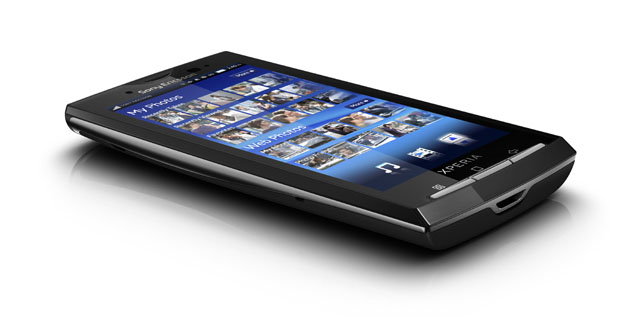
Sony Ericsson has pulled out no stops with the design of the Android-based handset. It is slim, sleek, sexy and the overall finish of the model we reviewed is a high gloss black. Shades available in the handset are ‘Sensuous Black’ (review phone shade) and ‘Luster White’. The dimensions are 119x63mm and the thickness is a slender 13mm.
Holding the device, it is far lighter than what is expected with a device that sports a large display, weighing only 135 grams. The 4″ display is 480×854 pixels (Wide Video Graphics Array or SVGA) and is flushed to the handset casing with a thin transparent overlay. While the display is large, it is still easy to hold and type one-handed without it being unwieldy.
Viewing video captured by the phone or on YouTube is a relief to the eyes compared to viewing video on other handsets.The combination of the large display and the 1GHz Snapdragon CPU makes for a great portable gaming device. I tested a few games, but the game I spent the most time on was a tower defence game called Robo Wars. The Xperia handled a high number of enemies and weaponry effects on the screen superbly.
The absence of multi-touch is not missed — the touch screen is highly responsive and reduces multi-touch to a moot point. Auto-rotate was responsive and had a higher response rate on media than it on other applications like Gmail and messaging.
I was impressed with the 8.1 megapixel camera and used it at a variety of media events (for example, see this CeBIT photo gallery). It has image stability, which came in handy at fast-paced events. Although it doesn’t have a flash it does have a photo light option which is as vivid as a led flash but a little bit cumbersome to enable and disable via a menu system.
I liked the easy and fast pick up of the smile detector. Other features include geo-tagging and a self-timer. Switching from photo to video mode is easy and just takes one press of the video or image icon. Images and photos captured are easily shared and explored with options of Gmail, Picasa, messaging and Facebook etc.
Internal memory is 1GB with an 8GB memory card and expandable memory is up to 16GB. I took a lot of photos and video and didn’t experience storage problems. An average day of using the Xperia consisted of phone calls, messaging, tweeting, constant Gmail access, Internet browsing and capturing photo and video. and I only had to recharge once every 2 days on average.
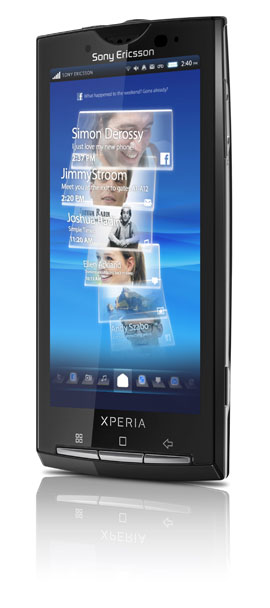
The home screen has a drag and drop application shortcut functionality, with 3 screen spans available by scrolling left or right. Timescape, one of the key feature applications of the Xperia X10, holds the home-screen centrepiece and ties in all commonly used communication and media applications to one control point. Timescape already takes into account messaging, phone calls and media captured with the phone and by logging into accounts such as Twitter, Facebook and Gmail, it will add their activity to the timeline.
The timeline is graphically represented as a series of titled tiles with each tile representing an activity, a phone call for example would represent one tile with the call details and contacts picture displayed on the tile. The user can scroll up and down the timeline to view call history, SMS, google chat messages and Facebook updates for example.
The application timeline can be isolated by scrolling to the left or right, for instance a user would scroll across to the image icon to view just the photo timeline. Media like video and images can be widely shared and explored through Timescape using avenues such Facebook, Goggles, Gmail, Messaging, Picasa and Twitter.
Mediscape is a media-focused application available on the handset which is similar to the Timescape functionality in the way it compiles user data across different web accounts — for example Facebook and Picasa are integrated into the image category. Mediascape is in three main categories: Music, video and photo. Each category has main sections like recently viewed, recently taken/added and favourites with other sub-categories available like shuffle and most-viewed.
The video and music categories have the option to send out and share using Bluetooth, Gmail, messaging and Moxier Mail where as the Photo section has no such options (in Mediascape). The absence of such options is a crippling feature of Mediascape considering it is in the basic google applications.
Timescape is a convenient application with a jazzy user interface design, but both it and Mediascape are taxing on the phone’s battery life. The CPU struggles to a noticeable level when all accounts I could throw at it — such as Facebook, Twitter, messaging and media — are thrown into Timescape on high update refresh. Which just goes to show the 1GHz Snapdragon CPU is smoother and harder to meltdown than Teflon.
Our final recommendation for the X10 is to put the Android 2.2 on as an operating system as soon as possible rather than waiting out until the end of the year, Q4 2010, before Sony Ericsson updates the firmware from the current 1.6 to Android 2.1. It may only be a matter of time before the modding community makes Android 2.1 or 2.2 available on the Xperia. Although it is not probably recommended by Sony Ericsson to mod your phone, ironically the price point of the phone is likely prohibitive to the development community and little has been achieved so far.
As the Xperia is a top-shelf phone and is in the high bracket price range it wouldn’t be a bad strategy to shave the unlocked price in order to make the choice of the Xperia over the Desire and iPhone that little more tempting.
A Three 3G sim card was used with the handset during my experience with the handset. Sony Ericsson blog has revealed that along withe the 2.1 upgrade in Q4 2010 is HD video recording and upgrades to Timescape and Mediascape. The Sony Ericsson handset was first available on the Three network April this year and beat out all the major carriers to the punch — it was available on Telstra the 4th May. It is also available now on Optus and Vodafone.
Image credits: Sony Ericsson
So what’s involved in slapping Android 2.2 on the X10?
Are you going to give it a go?
Once Ericsson prys the X10 from your cold, dead hands… yeah, sure. Have rooted and imaged G1/G2s, but don’t think they’re powerful enough to run 2.2 unfortunately.
I told you , if you swim over here you can have it. But I would like to see what happens if and when you get your hands on one.
Well, I agree the review, but my battery life is lucky to give one day which is bummer – thats just calls and 3g, the update would be good, and I might have a look at a new “dialer” in the market place as scrolling for contact number is a little tiresome.
On an average day, I did’t usually make/receive a high number of calls on the handset. Most of my calls are through Skype or I use other methods of communication. The dialer was a little niggley if you have a lot of contacts but the text bar made it a whole lot quicker to get to the right contact.
I figure from your previous post that you are using Skype on Sony Ericssion Xperia X10. If correct, can you please advice me…how did you manage to download Skype on SE X10 as I can’t find anyway to download it on my X10? I bought this phone yesterday and If I cant use Skype…I don’t see anypoint keeping this phone. Please reply asap.
Many thanks
mmmm snapdragon. That phone needs some cyanogen lovin.
It does! But what handset doesn’t?
Comments are closed.