

Jenneth Orantia turned her back on a lucrative career in law to pursue her unhealthy obsession with consumer technology. She’s known for having at least half a dozen of the latest gadgets on her person at a time, and once won a bottle of Dom Perignon for typing 78WPM on a Pocket PC with a stylus.
review Hey look, it’s an iPad with a built-in keyboard! No, but really, Apple seems to have gotten the upgrade path all worked out for those that are enticed by the iPad’s slick design, but need something more along the lines of a “real” computer. The MacBook Air starts at $1099 for the 11” model with 64GB of flash storage (only $100 more than the 64GB iPad 3G) and is also available in a 13” model – both with numerous configuration options for the processor, SSD and RAM.
Design
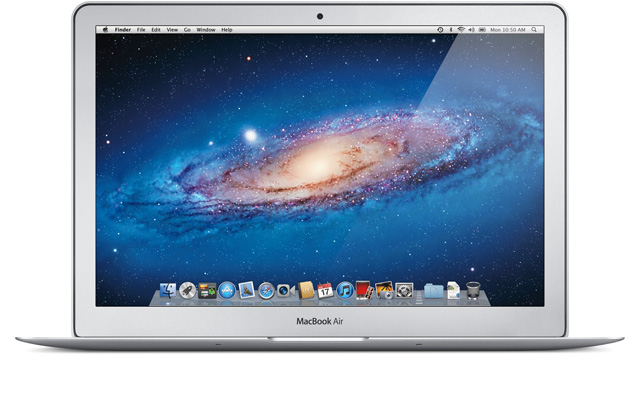
The latest version of the MacBook Air looks much the same as the previous model, although both the 11” and 13” models have gained a few extra grams. In fact, the MacBook Air has hardly changed at all since the original model launched three years ago, and the fact that it still looks cutting edge is a testament to just how far ahead Apple’s industrial design is.
The MacBook Air employs a stylish unibody aluminium construction that measures an impossibly skinny 3mm at its thinnest point and 1.7cm at its thickest. Our 13” review unit weighs in at 1.35kg, and while you can now get laptops that weigh less (the original MacBook Air was the lightest notebook of its time), it’s still astonishingly light for its size.
This pencil-thin profile comes at the expense of available ports. While this latest MacBook Air has more I/O options than previous models, it’s still limited compared to a “regular” laptop, with only two USB 2.0 ports, and no Ethernet, FireWire, VGA or HDMI sockets. The 13” model has an SDXC card slot that accommodates the latest high-capacity memory cards, and it has inherited the Thunderbolt port from the MacBook Pro for lightning-fast (geddit?) connections to compatible peripherals like Thunderbolt-enabled external hard drives and the new Apple Thunderbolt Display. You can also get optional adapters to convert a USB ports to Ethernet and the Thunderbolt port to DVI or VGA.

Features
The latest version of the MacBook Air breaks free of the idea that you need to make compromises for the sake of mobility. It may weigh the same as a netbook, but it handles like a full-sized laptop, with the choice of second-generation Intel Core i5 and Core i7 processors – paired with speedy flash storage drives ranging from 64GB to 256GB – giving the MacBook Air a much-needed performance boost.
The 13” MacBook Air has a near-identical footprint to the 13” MacBook Pro, so you’re really not giving anything up with regards to comfort. If anything, you’re actually getting a smoother ride thanks to the higher 1440 x 900-pixel resolution (the equivalent MacBook Pro has a 1280 x 800-pixel resolution). This pixel density feels just right for the screen size, giving you ample room to browse webpages and comfortably view two windows side by side. The keyboard offers a great touch-typing experience thanks to the full-sized layout and ample room for resting your wrists, and one of the new additions to this year’s model is a backlit keyboard, which kicks in automatically using an ambient light sensor.
Our earlier reference to this being an iPad with a built-in keyboard may have been tongue-in-cheek, but it’s actually much closer to an iPad than previous models. The Mac OS X Lion operating system introduces many iPad-like features such as an integrated Mac App Store, an iOS-style apps launcher called LaunchPad, support for full-screen apps, and an instant resume time. The over-sized trackpad supports many of the same multi-touch gestures as the iPad (along with a few extra ones), and Apple has even reversed the scrolling action to match the iPad’s “natural scrolling” – a change that’s jarring at first, but along with all the other gestures, feels like second nature with a little practice.
Performance
The most significant change in this latest MacBook Air is the upgrade to second-generation (SandyBridge) Intel Core i5 and Core i7 processors, lifting its performance to that of a mainstream laptop. Our review unit was the entry-level 13” configuration, which has a 1.7GHz Intel Core i5-2557M processor, 4GB of DDR3 RAM and 128GB of flash storage. Using this as our day-to-day machine, it felt extremely responsive, with no lag at all when multi-tasking, switching between tabs in Safari, and launching Mac OS X Lion’s groovy new Mission Control feature (which combines Expose, Spaces and Dashboard).
Apple doesn’t offer an option to upgrade the integrated Intel HD Graphics 3000 GPU, so you’re better off upgrading to a MacBook Pro if you want a machine for gaming. Still, the MacBook Air isn’t exactly a slouch when it comes to graphics processing – it was able to stream 1080p Full HD video clips off YouTube completely smoothly.
We’ve already mentioned the MacBook Air’s iPad-like instant resume times – a feature that’s worth its weight in gold for power users. It’s not quite as good as the iPad, though, as the Wi-Fi connection switches off while the machine’s sleeping, and you’ll have to wait a few seconds after resuming before it reconnects. From the off state, it boots to the desktop in only 20 seconds.
Apple claims the 13” MacBook Air is good for seven hours of wireless web surfing and up to 30 days of standby time. We didn’t have the MacBook Air long enough to test the latter claim, but in our battery run-down test (a mix of web surfing and word processing), we only got 5 hours and 20 minutes. This was in a fairly dim room with the shutters drawn, however, which meant the backlight was consistently on and the screen brightness (which also adjusts automatically to ambient light conditions) was fairly high. In a well-lit room (or with the screen brightness manually turned down), you should be able to get a lot closer to the advertised seven hours.
Conclusion
The MacBook Air is now in its fifth generation, and it’s grown up from being a fancy play-thing for cashed-up road warriors to a machine that’s fully capable of everyday computing. There are other thin-and-light laptops that offer better battery life, higher-res displays and more on-board ports, but you’ll also have to pay a fair bit extra for the privilege. The excellent performance and first-class build quality make this latest MacBook Air an outstanding buy for the asking price.
Image credit: Apple
Hang on, you’re going to call out the lack of VGA or HDMI outputs but not mention the Thunderbolt port?
Fixed :)
The main question I’m asking myself is whether this MacBook Air is worth spending my money on, or whether I’m better off waiting for the new ultrabooks coming soon from Acer and Asus. So far it doesn’t sound like the latter would be significantly cheaper than Apple.
I would personally recommend a MacBook Air, rather than a Windows machine. My personal experience has been that Apple’s laptops just have much better battery life then the alternatives.
My Windows 7/Xubuntu based Tosh R830 (same weight as 13 MBA) runs for about 6 hours. When I’m out of battery I hibernate and swap over battery. Takes about 60seconds to do. That’s with a ‘real’ i5-2520 that runs at 2.5GHz and outperforms many desktop machines. When it’s thinking hard it sure blows heat out of the side.
When I’m at home I can run dual screens and external 1TB USB3 drive from the docking station.
So much more convenient. Explaining this to my Apple fanbois supervisor (iPad, iPohne MBP, several 27″ iMacs) doesn’t get any meaningful counter response. He thought his new MBP booted quickly until I fired up Win7 after getting off a flight.
The industrial design of the MBA is lovely, but brand name machines have their own aesthetic and appeal. I like the ‘all black’, almost sinister, look of the R830.
Interesting. I hadn’t considered the battery swap thing. I would love to be able to do that with my MacBook Air.
I didn’t realise you could get such good performance out of a Toshiba machine — the ones I had seen recently had been pretty clunky. However, it sounds like they’re worth investigating.
For the record, what I am looking to find in my future ultrabook is a replacement for my current netbook. Something that takes roughly the same amount of space in my bag, won’t encumber me much, won’t cost me that much, but be able to deliver much more.
I was hoping Asus and Acer would deliver on their promise for sub $1000 ultrabooks, but it seems like the upcoming Asus Zenbook UX31 will be on the wrong side of the $1000 barrier. The same goes for Acer.
Given pricing, bulk and functionality the above mentioned Toshiba looks like a winner. I, however, will probably wait for prices to come down.
Isn’t the backlight dimmer in a dark room because it doesn’t have to compete with background lighting?
I mean, that seems to be how all the auto-brightness features I’ve ever used work.
Brighter room = must make screen brighter so you can actually see it.
Dimmer room = save energy because its the brightest thing in the room anyway.
logic like “it was in a dark room so the backlight had to run the whole time” … It isn’t an e-ink display here guys. (no free pass marks for the battery!)
PPS. other laptop manufacturers should really take note, just make a laptop with an SSD and everyone will love it, from boot time, to performance, to power usage. The good looks and worth-while processor are just the icing on the cake.
(despite my previous comment for what the machine is targeted at – ultra portable non gamers – the macbook is the clear winner, it is even priced really reasonably)
Saw the prices Dick Smith are charging for the new Acer ultrabook. They must be joking if they think people would prefer those over the MacBook Air.
Comments are closed.