

Jenneth Orantia turned her back on a lucrative career in law to pursue her unhealthy obsession with consumer technology. She’s known for having at least half a dozen of the latest gadgets on her person at a time, and once won a bottle of Dom Perignon for typing 78WPM on a Pocket PC with a stylus.
review It’s no secret that the Motorola Xoom was rushed to market. When it first launched with Telstra at the end of May, the Xoom was running an older version of the Android Honeycomb operating system and the microSD card slot didn’t even work. Worse, the OTA software update promised by Telstra didn’t materialise until two months after its launch. But now that most of the original issues have been fixed, Optus has picked it up, and a cheaper Wi-Fi-only model is available, does the Motorola Xoom have a better shot at competing for tablet buyers’ affections?
If you are interested in picking up the Motorola Xoom, make sure to check out our article on our sister site Delimiter Marketplace, on where you can get the best deal on the tablet.
Design
Along with every other tablet maker, Motorola was caught with its pants down when the iPad 2 launched. The Xoom’s 730g weight and 12.9mm thickness is on par with the original iPad 3G, but it doesn’t come close to touching the sequel.
Truth be told, we don’t actually mind the Xoom’s extra girth all that much. The iPad’s weight loss makes sense, as the 4:3 aspect ratio screen means you’re just as likely to use it in portrait orientation with one hand as you are in landscape orientation with two hands, but the 16:10 widescreen display of the Xoom means you’re going to be holding it with two hands in landscape view most of the time, and the extra 100g isn’t as big of a deal.
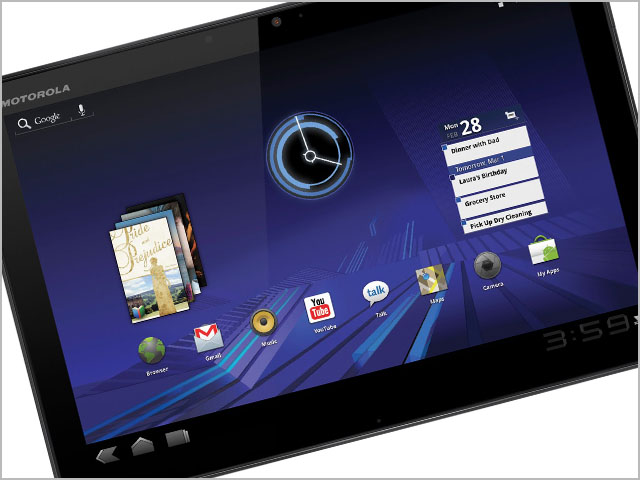
The handsome glass-and-aluminium enclosure is a nice change of pace, as most tablets are constructed from plastic and don’t have the same premium feel of the Xoom. There are no physical buttons on the front, just a Motorola logo on the top left corner. A rubberised black ‘hat’ on the back houses the headphone jack and SIM card tray, the latter of which sits on top of the microSD slot. You can hot-swap microSD cards in theory, but you have to remove the SIM card first – once you replace the SIM, you’ll need to reboot the Xoom before it’ll read the SIM again.
Motorola seems to have a penchant for putting the power button in weird places lately. It’s not as oddly-positioned as the power button/fingerprint reader on the Atrix smartphone, but its placement on the top left-hand rear of the Xoom is still baffling given the casing is more than thick enough to stick it on the top edge where you’d expect it to be. Joining the power button are two speaker grills, a five-megapixel camera and dual LED flash. The bottom houses a micro-HDMI port, micro-USB port, and charging pin.
Features
The Motorola Xoom belongs to the first generation of Android tablets where all of the specs are more or less identical. It’s got the same dual-core 1GHz Nvidia Tegra 2 processor, 1GB of RAM, front and rear cameras and 10.1″ 1280×800 display as all the others, along with 32GB of internal storage. It’s all getting a bit boring, to be honest, but there are a few minor differences that set it apart. While you can’t swing a dead TouchPad these days without hitting yet another Honeycomb tablet, there aren’t too many that are 3G-enabled like the Xoom. And if you insist on comparing it to the iPad, both the Wi-Fi and 3G flavours of the Xoom have GPS built-in, whereas only the more expensive 3G version of the iPad has this.
The Xoom originally shipped with Android Honeycomb 3.0, but the latest over-the-air software update boosts this to 3.1. It’s not the latest version of Honeycomb, which is 3.2, but the difference between those two versions is negligible from what we can gather. The bigger difference is between 3.0 and 3.1, which enables the missing microSD card support, adds resizable widgets on the homescreen, additional apps in the multi-tasking panel, USB support for keyboards, digital cameras and other input devices, and updates to the core set of apps.
When arguing the merits of a Honeycomb tablet over the iPad, the latter’s lack of microSD card slot, USB, built-in HDMI and Flash support are typically the main advantages brought up. The Xoom offers all four of these, but the USB implementation is a bit spotty. You’ll need to track down a micro-USB adapter to turn the built-in slot into full USB, and even if you manage to find an adapter (your best bet is eBay), it only works for wired keyboards and game controllers. Honeycomb does support USB host for transferring files from flash drives, digital cameras and memory card readers, so we’re not quite sure why Motorola has left this functionality off the menu.
Performance
The Xoom’s system performance is markedly better with the 3.1 software update. We didn’t get a chance to benchmark it before installing 3.1, but the improvements were obvious in app response times and web page rendering. There were only a couple of instances where the Xoom felt slow –mainly when bringing up the multi-tasking panel on the homescreen and swapping between portrait and landscape orientation.
The default web browser does decent job at rendering complex web pages, although it trails behind the iPad 2. The Xoom loaded the SMH website in 14 seconds, compared to the 11 seconds on the Apple iPad 2. The Xoom’s browser also has a tendency to redraw screen elements while you’re scrolling through the page, even after it has fully loaded, making panning around the page a little jerky. Unlike the iPad 2, however, the Xoom can play embedded Flash videos and games. Not with the same flawless execution of the BlackBerry PlayBook – videos were a little stuttery and the audio sometimes fell out of sync – but it’s good enough for watching short web clips, and it certainly beats the empty space that you’d otherwise see on an iPad.

Motorola hasn’t employed any fancy screen technologies like IPS or LED backlighting in the Xoom’s display, and as a result, it’s the worst out of any of the tablets we’ve seen recently. Of course, we’re not including low-end tablets in that count (all of which tend to have crappy screens by design), but compared to other tablets in its class, the Xoom’s display is dimmer and less vibrant – a shortcoming we noticed immediately when browsing through photos and playing movies. There’s no oleophobic coating on the Xoom’s screen to minimise the appearance of fingerprints either, so it gets pretty greasy-looking after you’ve been using it for awhile.
The mediocre screen is a shame, as the Xoom is otherwise quite a good tablet for playing movies. The 16:10 aspect ratio is almost perfect for watching widescreen movies. There’s only a tiny bar above and below the picture, letting you really take advantage of the full 10.1in screen size – quite a difference to the thick black bars that you see when playing the same movie on an iPad. The Xoom’s rear-mounted stereo speakers are plenty loud for personal use, and even more so when it’s lying on a flat surface, as the audio bounces back up to create a louder and richer sound.
Motorola claims the Xoom is good for 10 hours worth of video playback, but our tests had it running out of battery a lot sooner. With 3G on, Wi-Fi off, and screen brightness at 50%, the Xoom lasted for only six hours and 32 minutes when we looped a mix of videos – a far cry from the 10 hours we could squeeze out of the iPad under the same conditions.
The Xoom charges through a proprietary port using a laptop-like power brick. Naturally, this is less portable than the smaller chargers that other tablets come with, most of which combine the USB cable with a power plug, but it does have the advantage of charging the Xoom faster. While most tablets take around four hours to fully recharge from a dead battery (including the iPad 2), the Xoom manages this feat in half the time.
Conclusion
Motorola has priced the Xoom to match the corresponding iPad 2 models. The question is, why would you buy a Xoom when you could get an equivalent iPad 2 for exactly the same price?
There are minor things that the Xoom does better. It can play Flash, it has microSD card expansion, and the widescreen display is better for watching movies. But these are all small details that don’t really add up to a tablet that’s better, or even as good as, the iPad 2. There are so many more things that the iPad does right, from the ultra-portable form factor and speedy performance to the longer battery life and superior app selection. At the very least, the Motorola Xoom is an alternative to the iPad 2 that a small contingent of Android-loving power users will find attractive. But is it a threat to the iPad 2? Not even close.
If you are interested in picking up the Motorola Xoom, make sure to check out our article on our sister site Delimiter Marketplace, on where you can get the best deal on the tablet.
Image credit: Motorola
I wish I never bought my Xoom. At least I got it outright so I’m not on a contract. If you’re considering buying one then please send your money to me and I’ll either burn it for you … or if I’m in a particularly bad mood I’ll send you the Xoom, as a curse.
Interesting — what don’t you like about it?
Did my previous comment get lost in WordPress/Disqus?
1) App ecosystem – finding local, relevant and quality apps is hard. Plus finding apps that are tablet optimised is hard, the marketplace is for all of Android, internationally. Very messy data situation there.
2) OS 3 is still feeling like an early beta
3) Power/battery – it is no respecter of energy, nor your nearest recharge point.
It’s like Motorola ignored the fact the iPad exists ..
Yeah, I wanted to write a bit about the Android app ecosystem, but my review was bursting at the seams already! You’re totally right, and I think Google are purposefully not including a Honeycomb section in the Android Market because the selection is embarrassingly slim at the moment. That said, the app situation has definitely improved from when Honeycomb first launched, but you’ll have to work to find them.
There’s definitely a LOT of room to improve with regards to Honeycomb. I haven’t done a lot of reading on Ice Cream Sandwich (the next, ridiculously-named version of Android that’s meant to unify the smartphone and tablet OSes), but hopefully that’ll improve things.
Yeah, I wanted to write a bit about the Android app ecosystem, but my review was bursting at the seams already! You’re totally right, and I think Google are purposefully not including a Honeycomb section in the Android Market because the selection is embarrassingly slim at the moment. That said, the app situation has definitely improved from when Honeycomb first launched, but you’ll have to work to find them.
There’s definitely a LOT of room to improve with regards to Honeycomb. I haven’t done a lot of reading on Ice Cream Sandwich (the next, ridiculously-named version of Android that’s meant to unify the smartphone and tablet OSes), but hopefully that’ll improve things.
Yeah the first gen tablets really don’t seem all that great.
The PlayBook is actually pretty good, but yeah, first-gen Android is a bit dud right now. The problem is, by the time they’re onto second-gen, Apple will be onto third-gen. Apple realistically had an extra year’s worth of launch time on these guys, and it will take them a long time to catch up.
Depends on when the iPad 3 launches. I think the second-gen Android tablets – which I define as ones that aren’t clones of one another (such as the new Samsung and Sony tablets that were launched at IFA) – are due to be released in October, although AFAIK, they’re still running Honeycomb
Interesting. If that’s accurate, we should see some pretty sharp discounting on the existing batch before that period, because I doubt they will sell out ;)
Agree – I have an iPad 2 and an Acer Iconia tablet, and the former is undoubtedly the superior device. However, I only paid $400 for the Acer and at that price it’s well worth buying IMO. It’s when the Honeycomb tablets price themselves in iPad territory that it gets a bit ridiculous – for anyone who isn’t a diehard Android fan the choice would be pretty obvious when the price is the same.
I think the various Android players are slowly starting to learn that lesson, and the recent TouchPad fire sale should help to drive the point home – these things will sell like mad, if the price is right. Just don’t pretend it’s an alternative iPad, because right now it simply isn’t. It very likely will be, but my guess it will be when the third generation is rolled out.
+1
Does this ” Motorola Xoom” support VBK format ?it was a great article and discussion i also read a briefed discussion about Motorola xoom here http://www.motorolaatrixforum.com/motorola-xoom-general-discussion-f23/motorola-xoom-review-t1339.html
My 10 year old bought herself an ipad2 (years worth of birthday and Xmas money saved up). She adores it but is frustrated that it does not support adobe flash (iSWiFTERfor ipad is slow and not worth downloading). Both her and her sister want to use Mathletics (not just Mathletics live) and play Fantage – both of which need Flash and/or Shockwave. My youngest is now wanting a Motorola Xoom 32G WiFi for this reason. At $392 I was seriously considering it.
iPad2 32g WiFi only $674
Xoom 32G WiFi only $392
For a child that wants to play online games, do maths homework and play app games which is the better choice? I don’t want to regret her decision and wish she had bought one like her sisters!
Comments are closed.