

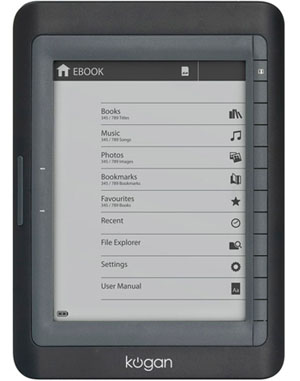
This article is by Darryl Adams, a government worker and internet tragic. A former IT worker, he still pines for the days of IBM keyboards that go CRUNCH and the glow of green screens. He can be found on on Twitter or on Facebook. Check out his site oz-e-books.com for more articles about e-book readers, retailers, formats and news (or will have when Darryl can be drawn away from reading Delimiter). The views expressed here do not reflect the views of his employer, the ATO.
review Kogan is an Australian brand that forgoes brick and mortar retail and sells its product only via the internet. Known for its TV and other consumer products, this is the company’s first e-reader release.
Overall, the hardware is well-produced and there are some nice touches. The reader has a SD card slot (with a dust cover), 2 buttons on the left-hand edge, and 12 multi-function buttons on the right (flush to the screen). It also comes with a headphone jack and USB jack on the bottom, and a small reset button (requiring a pin or similar to activate) on the back. The power button is on the top right corner of the device.
The unit feels solid to touch. However, if there is one fault, it is that the buttons are stiff and feel plasticky when pressed. While more responsive buttons would have been great, this does not distract from the Kogan to a great extent.
The 6 inch e-ink screen is whiter than other screens I have seen and the display is crisp and has a fast refresh rate. Text and pictures render nicely, and this is the first reader that I have tested that does a great job on PDF files. Instead of the pan and scan that I have seen on other devices, the Kogan displays the files fully and nicely on the screen. Text-heavy PDF files can be reflowed, making them easier to read on the Kogan; however, this feature is not so great on graphic heavy files.
E-book files are well-supported, with the basic rendering of the reader using FBreader and DjVuLibre open source programs. The Kogan even has MS Word support via Anitword. The use of Linux is a good choice, as it allows a wide range of fonts and good graphics support using Linux libraries (such as like libpng, libjpeg, libgif and libexat for XML).
The reader also has music playback — it is capable of any codec supported by MAD Mpeg decoder. I found the supplied earbuds slightly tinny, but the ability to play music (and for that matter, a 16 shade greyscale picture viewer), an added bonus.
Digital Rights Management support is supplied by Adobe, so any store that uses Adobe DRM will be supported (in real terms, everyone except Apple, Amazon and books using Microsoft DRM).
The menu system on the Kogan is simple and elegant. The page forward/back buttons are used to flick through the menus (and the book pages themselves). The right-hand buttons relate to the information displayed on the screen. The top button is the menu button, and the bottom is the return to previous level. When there is no menu, the other buttons are inert. The Kogan can allow text and number inputs, so you can search large libraries with ease. Alphanumeric entry is based on a similar system as that used on mobile phones (and this is one reason I would prefer better tactile buttons). It does take a little to associate the top and bottom icons to what their function is, but once learnt, it is a fast and effective system to navigate the power of this device.
Booting up the device is not the fastest experience, but once started, the device is responsive to input.
If there is one flaw in the reading experience, it is that there is no last page memory. The software has a rich bookmarking system, but you need to mark your page before turning off or going to another book. Books themselves are tracked with the recent button on the main menu screen, but the 1st page is displayed when the book is opened. The manual step to keep track of your last page is one feature that I would prefer to be fixed in a firmware update.
The Kogan comes supplied with earbuds, a USB cable and a leather cover. At $189 the device it is about $40 more than the Kindle Wi-Fi, but is $10 cheaper than the Kobo. It contains 1500 e-books, including many Aussie classics and works in the public domain. The fact that it supports the Adobe DRM schema makes it a great device if you buy books from Aussie e-book retailers (and the fact that it supports most e-book formats makes this device less tied to one or two retailers).
The fact that this device is built on the best of breed open source, yet works with a propriety but widely used DRM schema makes this a very strong device. For those with a wide library of e-books in different formats, this would be a great reader. Tweak the buttons and some UI features, and this for me would be the perfect reader, and a strong first effort from Kogan.
Image credit: Kogan
Haven’t purchased anything from Kogan as yet but I am impressed by the breadth of his devices and his ability to be quick to market with them. Its also great that he is local so you can get some support if needed.
Sounds good. Thanks for the review. I’m wondering how pro active they will be with updating firmware. I’m guessing it’s probably just a skin job of some mass produced eReader from China or Taiwan.
Can’t tell, but my guess it is made by Gajah, a singaporean company
There is an earlier story I wrote here http://oz-e-books.com/news/2010/7/23/gajah-the-maker-of-the-stash-pico-and-the-kogan-ereaders.html
I own a Kogan e-reader and it certainly remembers the last page I am up to, on each book. The only time it ‘loses’ the page is if it auto shuts down (and you haven’t exited the book via 1 button press).
Hi Michael.
I received my Kogan e-book reader last Tuesday. And so far I am very happy with it. But if I don’t bookmark my last page, I lose it and have to go and find it again. So how come that yours remember the last page if you don’t bookmark it?
Anneke.
Hi Anneke,
I find all I need to do is make sure I ‘exit’ the book back to the main menu using the bottom soft button (the return arrow). As long as I’ve done that it remembers exactly where I was (I don’t change zoom settings either). If however you leave it and it turns itself off, or you turn it off while reading, without returning to the main menu it will lose your spot.
Hi Michael,
I did exactly what you said and it did not work. It only works when I go back to main manu, using the return arow, and go to an other book, use the return arow again and then back to the book I was reading, then it rememberd the page. But if I switch it off after using the return arow. And then switch it on again and go to the book I was reading, it started from the beginning again. That means I have to use the book marks I quess!
Maybe it’s a function of the type of file? All my books are in ePub format.
Maybe that is why. As the books I put on are in PDF file. And I zoom in and reflow to make it easier to read.I kee your note handy and will see how it is when I have a book in ePup format.
Thanks.
I use the free eBook manager Calibre which also converts PDF to ePub. It might be something you want to look into.
I wiil look into it. Thanks again fo your help! :-)
Page-turn buttons on the left, Darryl? That would work best for me.
I’d still prefer mappable buttons, since even people with the same dominant hand often hold a device in different hands.
More to come… ;)
Yep. 1 button with a see/saw type config. Bottom part for advance, top to go backwards
Darryl,
Have had my eye on the Kogan and have been eagerly waiting for a review – so, many thanks.
Quick question – you say the unit has a fast refresh rate. The only other ereader i’ve played with so far is the Kobo and to me (as I say, with a great lack of experience) the refresh rate seemed slow. I don’t suppose you’ve used a Kobo? Do you have any idea how the refresh rate compares between the two?
I have a Kobo, it was the device that got me into writing Oz-e-books.
The Kogan has about 1/2 the lag refreshing than the Kobo, even after the 1.4 firmware upgrade.
And to be above board, I did have a loaner Kogan, which I have now bought :-S
They have just put the price UP to $226 for the next shipment in September. Lost me
I saw that as well GT, a comment on my blog says it has to do with an Ad buy on the Ben Cousins show.
While I believe Kogan needs to get its name out there, it would be better not to fold the cost onto a new market segment. $229 is still OK, but makes the Kindle much more competative pricewise.
And while I was typing this response, I got the answer. The 20% price hike is a stunt(!). Prices will be back on monday.
See the youtube add for for an explanation: http://www.youtube.com/watch?v=iNlLrC_wgkc
Thans Darryl. I don’t know what they hoped to chieve by such a ‘stunt’ besides put a few potential customers offside. Mystifying
I just bought a Kogan yesterday off Kofan’s website and only paid $189.00 plus postage…where are you buying it from?
I reckon the “logic” behind the “higher priced sale” is that higher priced items are not better quality, just better advertised. So they are saying why pay top dollar for a product advertised in the mainstream media when you can get equivalent quality buying online without the expensive advertising. Quite clever really. And having a dig at mainstream retailers too …
Fair call, Linda
It would be interesting to hear if anyone who unknowingly did buy at $226 were sent a ‘wait till Monday’ email…
Back to $189 this morning…
The Kogan Ereader has a few bugs. It wont reliably keep the bookmark. They say there’ll be a fix in a few weeks. Also the Zoom feature is unreliable and reverts to small print. Otherwise its good value-provided they fix the bugs.
I got my Kogan for my birthday. I charged it from the mains and then couldnt turn it off so I pressed the reset button. Now I’ve lost myu 1500 preloaded books and still can’t turn it off using the on/off switch. Any ideas on a) how i can reload or retrieve the preloaded books (none of which I have read) and b) is the on/off button a typical glitch that others have experienced.
Thanks,
Dom
HI Dom,
I think you best to contact Kogan. I think your e-book reader is faulty. Go to “Contact” en there you can talk to them on line or ring them. Explane your problem and they will give you a case number and you can send it back. They will then send you a new one. I believe they also return you the money you have to pay to send the e-biook reader back to them.
Good luck
I’ve had similar problems. Kogan Support say a ‘Fix’ is coming. So far, I think its a piece of junk.
I love my Kogan…have had it about a month now and had no problems…have loaded books onto it and that is so easy to do…have also loaded music so now i get to listen to my music and read anywhere anytime i want….havent had to recharge it yet and i use it almost everyday…..gotta say best buy i every made.
can you buy kogan in a shop as I would like to see one in person before buying.
I’ve only once been able to load any e-book onto my Kogan. The rest of the time all I get is the message that the computer can’t recognise the device. This happened the first time too, then we used a higher powered (if that’s the right term) USB hub, and downloaded the one book, a freebie, actually the Complete Shakespeare. But no ebook I’ve purchased, and I do use Calibre, can make it to the Kogan. This is using a laptop — it’ll be a nuisance if I can only load the Kogan from a PC. Anyone else had similar troubles?
kris
Target are selling the kogan at $149 rebranded as the Rank Arena.
The leather case is missing, replaced with a suedette sack.
I bought mine yesterday. So far I’m pleased.
However, cannot get my laptop to recognise the device.
Anyone know it I need Adobe or Calibre to transfer files?
After laptop reboot, they are now talking to each other. No extra s/w required.
You can download Adobe Digital Editions and use it to transfer files to the EB601. Or you can transfer direct to the folder of the reader files you have.
I have transferred 2 novels but unless left in the smallest size letters if will not display the whole page. Even in the smallest it will not show the last line on some pages.
If the size is increased, via zoom menu, it cuts off the side of page and then gives arrows to scroll across, which is hopeless in its operation.
But, I also transferred a small article on Einstein’s Theory and it shows up in large size letters and does not cut off the sides.
All files are epub.
I will ring the hotline and if I cannot get a solution will return to Target.
After 5x zooming in, click on “REFLOW” Then you can read the whole page, without cutting off the side of the page. I know as I have to do it everytime!
Cheers Anneke.
Anneke,
Thanks. I discovered this just an hour ago. The Rank Arena zoom does not show as 5x etc – it just shows letter size samples from which to select.
I do not remember ‘reflow’ appearing in the menu list when working on it yesterday. In fact the manual refers to ‘reflow ‘showing up instead of ‘settings’ when the file is PDF. But, all my books are epub, and the one I had open was a download from Borders. I check another novel where I had the overflow problem and it also showed ‘reflow’ which I again used to fix the problem.
So I checked another book, for which I had no overflow problem, and the menu shows up ‘settings’ and not ‘reflow’ The settings sub menu allows change of font, line spacing, margins etc.
It would help if the manual was in Aussie english instead of chinese english.
I will still ring the hotline because the unit locked up and I had to use reset button. Now all the files were there at the time have gone. I using reset causes this situation then I would view this as a fault and could be very inconvenient if travelling and had no access to the backup files on computer.
Garry
I paid for two books through Borders to put on my kogan. At first it worked fine but after I bookmarked an epub it stopped working. I deleted the bookmark then it worked, but now every time I try to read my epubs it says the file is not supported and the file size is too big and it wont open. Why cant I read epubs on my Kogan?
Do you have 2 folders’ Adobe Digital Editions ‘ and Digital Editions’ ? If so try deleting files from present location and put them in the other folder.
I have had other problems with bookmarks. When trying to use some of them I get message ‘decoding key error’. and selected bookmark does not work. Also the format for the bookmarks is not correct. They do not show page number or the text of the first line of the bookmarked page.
I have a kogan ebook reader and would like to know how long the batteries should last,as mine seem to die very quickly.
Hi Hans. The battery should last a very long time if you are just reading ebooks, text files etc – the website says 10,000 page turns per charge. But listening to music on it drains the battery a lot more quickly. Having said that, I got at least 6 hours of music listening in before the battery got low (on a very long train trip traveing thorugh Europe!). It’s possible you got a bad battery, in that case call or email Kogan and they might be able to exchange your ereader for one with a better battery.
I picked up mine earlier this month and it has a terrible battery life. A couple of days max with probably only 3 hours of reading time (no music yet). I knew they had problems with this previously but a girl from work got hers for xmas and it goes for a month and hours of reading time without being charged so I thought they had ironed out the problem. Anyway I will be in touch with support next week.
HI Greg, I’m sorry to hear that your battery life is very short. I bought mine Juli or August last year and my battery life last for a very long time. I only use it for reading though! Hope for you that they will replace the e-book. And that you will have more luck then :-))
Good luck, Anneke.
the products are good and wonderful. i like it very much
does anybody know how to put a dictionary on rank arena ebook reader?
I have owned a Kogan ebook for about eight months now and initially I had trouble turning the ebook off. But I then realised that you hold the button down a little longer, then it shuts down with no trouble. I have found it to be a very good buy, I paid $189.00 and it can turn the page from either side as there are two buttons that do the job also I’m left handed, so it’s great for me! In hindsight I would have liked a coloured screen as photo’s are only in black and white, but then I store all my photo’s on a removable hardrive anyway! It has a slot for a 2GB SD card but even without that I have enough reading material to last me for years. I’m afraid that I fell into the trap that DOM did by pressing the reset button! It certainly worked! As I also lost all my pre-loaded books. But I downloaded them again free from their site plus a lot of new books, so there was no harm done really. Have a great day. D. Pearce
i love it, but the one thing i hate is the bookmarking function which does not work when you have an epub ebook! i hope someone fixes this!
Have a Kogan ereader, when putting a book on it, lost the whole book that was already on it and reading. Title still shows in “books” and “Favourites”. Can I get it back, if so how?
Helen
I go t my ebook 2 days ago…but i havent been able to do anything..when i turned ON it says that i can touch anywhere to start calibration andy when i do it..just looks empty only a + at the bottom of the screen..i cant even turn it off…it is just calibrating, i can even see the menu. I have tried to recet becouse it looks like frozen but not sure how to…HELP…I call and email kogan but not answer yet..
Hi Angela. I have had problems with my Kogan too, but I found Kogan quite helpful so far. Have you downloaded the manual? From memory when calibrating there should be a cross in each corner. I had problems with this and had to do it a couple of times before I got it right. If you need to reset, use a pin and push it until you feel/hear a click. I had problems when I downloaded a book, I couldn’t find it or it wouldn’t open. Kogan suggested removing all the free books, and this worked ok. Now I have a problem with turning pages using the touch screen. It keeps going backwards. I am waiting for Kogan to reply to my email.
It has been a over a month since I emailed Kogan and I have had no reply. The touch screen turns back a page instead of forward most of the time. I am now of the opinion that Kogan ereader is just a piece of junk. Too light for a paperweight, maybe wedge it under the door to stop it slamming. Hope others have better luck that I have.
Sorry to hear that you have trouble with Kogan. Do you know that you can chat with them online?
I have my ebook reader for 2.5 years. Don’t have any problems with them at all. So far I am very happy with my ebook reader.
Comments are closed.